• Welcome back! Thank you for being a part of this Traders Community. Let's discuss and share :)
    Selamat datang kembali! Trimakasih telah menjadi bagian dari Komunitas Trader ini. Mari berdiskusi dan berbagi :)

Suggestion I will make a Free EA with your Indicator

Sorry, I don't get it. Can you explain with some pictures?

Hi Mr Tanaka san...

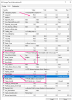
i set TP=35pips, martingale gap = 10pips, i also set Take Profit Type = Auto by LOT Size.
However, the martingale trades not closing when over 35pips, and also not closing even set "Auto by Lot Size"

These martingale trades keep hanging until account blown..

upload_2019-7-25_20-41-2.png

upload_2019-7-25_20-44-19.png
 

Attachments

  • upload_2019-7-25_20-41-2.png
    upload_2019-7-25_20-41-2.png
    36.5 KB · Views: 1,188
  • upload_2019-7-25_20-44-19.png
    upload_2019-7-25_20-44-19.png
    41.9 KB · Views: 1,036
Hi, I always use default.
Reverse mode look ok, if buy arow =sell order.

View attachment 92434

Mr Tanaka,
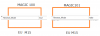
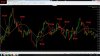
Why I get two Normal trades and no Reverse trades? (fig.1)
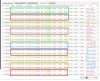
Can you please share the setfile for your account? (fig.2)

2.jpg
(figure 1)

_______________________________________________________________________________________________

d4988b12.png
(figure 2)
 

Attachments

  • 2.jpg
    2.jpg
    214.6 KB · Views: 1,040
  • d4988b12.png
    d4988b12.png
    28.3 KB · Views: 1,025
Last edited:
And i was big moving up like i said .
EUR/JPY.
SO PLEASE UPLOAD GOOD MARTINGALE AND HEDGING EXPERT, AND WE CAN ASK MR.TANAKA TO CODE MY INDICATOR TO EA
 
You need to increase PIP distance between martingale, your pip distance is 10 pip so if u can calculate manually, 10 orders will be active in 100 pips.

Increase Pip distance up to 30 and it's multiplier 1.8 then your orders will be less.

If you want each martingale to have separate TP then select option in martingale settings otherwise it will merge the TP of all martingale orders in to one and close them on breakeven. (instead of modify TP, select Separate TP).

Hi Mr Ahmad Khan,

Ya, i set TP=30pips, and the martingale have to distance up to 30pips .
However, that's what happened to my previous EA 3 strategies, and Mr Tanaka suggested to use Take Profit by Auto Lot..
for the martingales to hit TP will be bigger and bigger and it means harder for the martingale to close trades.

That's why i set pipstep distance smaller so that it will hit TP early, but it didnt.

tanaka akiko Is it possible to set a TP that not by average / auto modified by EA for martingale trade based on last order TP to close all trades?

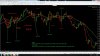
example the one in the picture i attached. the Buy Martingale.. only 2 Buys.. TP=35pips, but the price moved up more than 70pips.. but still not closing..
This happens when i set the TP as Auto by Lot.

upload_2019-7-25_20-41-2-png.92472
 
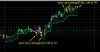
Hello Tanaka, kindle make an EA with the attached indicator.

*All the parameters should be customizable.

*Current TimeFrame- M1, M5, M15, M30, H1, H4, Daily.

BUY - When red cross above the green line

SELL - When red cross beneath the green line

** Option to choose if a trade should trigger - (i.) immediately at MA/lines cross or (ii.) at Close of the crossed candle.

*It should work with all currency pairs, commodities, metals, and cryptocurrencies.

*Email/Push notification.


**POSITION MANAGEMENT:

Take Profit:
- Close trade on opposite signal/lines cross
- Point specify by user

Stop Loss:
- Point specified by the user (Stop loss in pips)
- Trailing stop

*MONEY MANAGEMENT:
- Risk allocation for each trade - 2% (default) of Account Balance
- Manual lot size - To be set/input by user but default = 0.01


Thanks.


tanaka, kindly help to cod this to EA, please. Use this info alongside your EA template.

Thanks, sir.
 
Use H4 TF, reduce TP to 10, turn off trail.

If you set your TP high and leave it on trail, TP will never hit and before trail will fit, your martingale will turn on as your trail stop and martingale is on same distance.

I don't use trail as I don't see it profitable for my EA's anyways you can use if you like. Try settings as I have said and then see if TP hits more than last time or not and if martingale orders also reduced or not.

Ya. i understand about the trailing, it works for me as it is still entry follow trend direction.. only when not reach trailing parameter and trade reverse then only martingale kicks in.
Now my problem is the martingale trades closing part. If it can be close all by following last order setting then will be easier as the Tp wont be modified to average profit to close all trades.
 
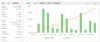
Hello, here are my demo test "zaman ea" results since July 19 on a 500 euros balance.
It's very good for now.
 

Attachments

  • Screenshot_2019-07-25-16-46-27-462_net.metaquotes.metatrader4.png
    Screenshot_2019-07-25-16-46-27-462_net.metaquotes.metatrader4.png
    251.5 KB · Views: 242
Mr. Tanaka please code this EA with this indicator.
I am asking you fromcouple of days ,ease do it for me .
I want this indi to determine the direction of positions and i wan to change the indi setups ,everything can remain so.
If you are agree i can explain when it gives a signal.
please i am asking all the time.
thanks.
 

Attachments

This only Tanaka San can help you. That is complicated way for me to trade, I just like simple trading, open and close, and if missed to close, take proper distance on martingale and close quickly. If I have to take this much tension even on robot then purpose of auto trading is finished.

Anyways, it was just my opinion, Tanaka San must have an option to set for you in your requested robot.

ya, thanks for your sharing about higher timeframe entry and less trades less tension..:ok:
for me i would like to have high, mid & low risk settings.
low risk for longterm set and forget
high risk for smaller amount of money with bigger return and frequent withdrawals.

yea, just wait and see if Tanaka san can modify the code or not.
 
Hi Tanaka
excuse me
EA_BO Trigger(revD)
please integrate FFCal or FFCal_minijp in a version E

for the moment i work without news filter
i tried to rename also new version of FFCal in old but error continue also with mini jp
Thank you in advance to integrate it with new template

upload_2019-7-25_17-43-41.png
 

Attachments

  • upload_2019-7-25_17-43-41.png
    upload_2019-7-25_17-43-41.png
    108.2 KB · Views: 1,123
Last edited:
Mr. Tanaka please insert this indicator in this EA.
I am asking you from couple of days ,pease do it for me .
I want this indi to determine the direction of positions and i want to change the indi setups ,everything else can remain so.
If you are agree i can explain when it gives a signal.
please i am asking all the time.
thanks.
 

Attachments

Hi, did you use Trade on New candle =false?
In the 2nd picture, maybe order were closed in the same candle, so next order was placed on the same candle.
In the first picture it looks 2 lines are not crossed but EA read current candle value, so even it crossed just once in real time, EA judge it is crossed.
The 2line is crossed in tick data and ended up with no-cross. It is better to compare 2 candle before closed data with 1 candle before closed data.

Hi tanaka akiko San,
Could you do a favor to add Time Filter and News Filter on EA Zaman Cross July 2019 ?
Many thanks in advance.
 
Back
Top