- Credits
- 0
Hi mr. Akiko
please say something,
please say something,


OK....and there are several trades on H4....Hi Sir tanaka akiko please can be make this profitable system by EA .
Logic :
The only indicator I am working with is MACD (standard setting 12,26,9). Just copy it to your indicators folder. I am using this with H4 timeframe.
BUY:
We are looking for a buy signal when both signal and main MACD lines are below 0. We enter the trade when the histogram turns to green color.
Add-on BUY:
If after the valid buy (both lines below 0, histogram turns green) the histogram turns to red and then turns to green again, you add another buy position.
## for buy Example check Buy Image
SELL:
We are looking for a sell signal when both signal and main MACD lines are above 0. We enter the trade when the histogram turns to red color.
Add-on SELL:
If after the valid sell (both lines above 0, histogram turns red) the histogram turns to green and then turns to red again, you add another sell position.
From left to right:
Sell, Buy, Sell, Add-on Sell, Add-on Sell
## for sell Example check Sell Image
EXITS:
Exit all open positions when you receive an opposite signal. This means you will always have an open position(s) - either buy or sell.
Here are some screenshots from MACD alone with signals marked, price levels with signals marked, and a combination of both.

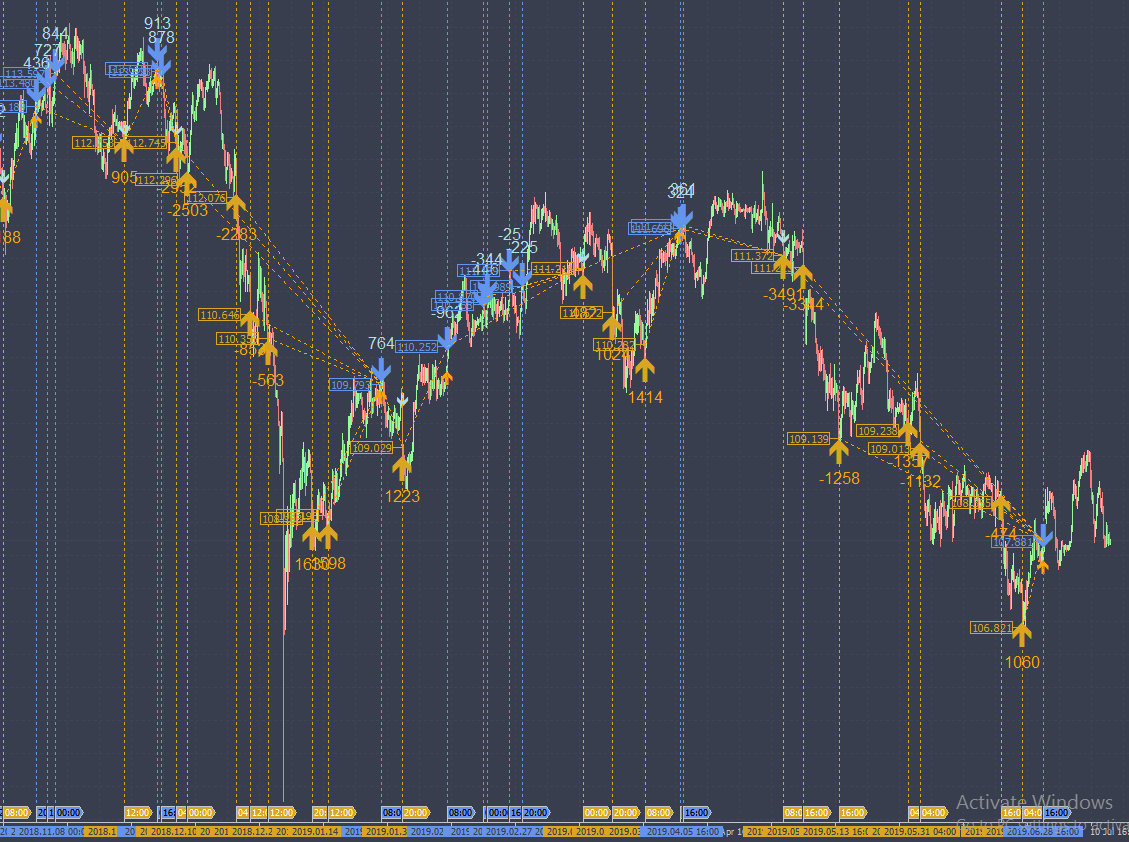
Nice and easy....you are a real master of the macd....letz do it...Hi Sir tanaka akiko please can be make this profitable system by EA .
Logic :
The only indicator I am working with is MACD (standard setting 12,26,9). Just copy it to your indicators folder. I am using this with H4 timeframe.
BUY:
We are looking for a buy signal when both signal and main MACD lines are below 0. We enter the trade when the histogram turns to green color.
Add-on BUY:
If after the valid buy (both lines below 0, histogram turns green) the histogram turns to red and then turns to green again, you add another buy position.
## for buy Example check Buy Image
SELL:
We are looking for a sell signal when both signal and main MACD lines are above 0. We enter the trade when the histogram turns to red color.
Add-on SELL:
If after the valid sell (both lines above 0, histogram turns red) the histogram turns to green and then turns to red again, you add another sell position.
From left to right:
Sell, Buy, Sell, Add-on Sell, Add-on Sell
## for sell Example check Sell Image
EXITS:
Exit all open positions when you receive an opposite signal. This means you will always have an open position(s) - either buy or sell.
Here are some screenshots from MACD alone with signals marked, price levels with signals marked, and a combination of both.

ha ha say well retina.I m the girl left in purple who does the dirty work....you may be in the center the guy who has the brilliant ideas to solve the cases....
100% perfect caption . BT result really magical . great thanks retina.Nice and easy....you are a real master of the macd....letz do it...

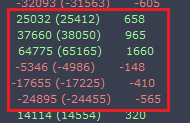

not near already gotJust some quick remarks: Not all pairs are profitable...but I hope mostly..
so just do a quick backtest with the ea...it does the action on one chart for 28 pairs but can be backtested in the strategytester for a single pair...
So even much to do..and many decisions to make....we are near the grail....
This is one really bad repainter...hope you know it!Please Mr tanaka akiko , can you convert this mq4 indicator to mq5 (source file)?
Thanks
Thanks, do you know a good alternative?This is one really bad repainter...hope you know it!
but this nothing hamper tradeThis is one really bad repainter...hope you know it!
One year backtest on EURUSD. Super arrow Rev ehi bro,
you can use my set file to this SA version and just adjust the default pip as you want. i use to BT in EU pair.

Yes.Great, this is from the EA which I have posted earlier, MA Basic.

Super Arrow is only indicator? I can not make BT with it, do you know why?One year backtest on EURUSD. Super arrow Rev eView attachment 91495View attachment 91496
Welcome to this thread.Super Arrow is only indicator? I can not make BT with it, do you know why?
Sorry, I'm autistic, I do not understand your sarcasmWelcome to this thread.

I have a question.Tanaka San, thank you so much for the revised version and EA is taking orders right on 3rd candle which is perfect, however now EA is taking orders on every signal, means when BUY is active and SELL signal appear, EA is taking that too, however as per BUY and SELL order = 1 only one order may active and another signal can be picked when previous order closed. I think instead of separate BUY and SELL order option, if it would be Max_Order than this will not happened.
Also my martingale is set to 30 pips but no martingale order picked.
Please check this short video on Everytick option as you told.
TF M5
https://streamable.com/f9ary
Order picking time on 3rd bar is perfect but if BUY or SELL or or it's martingale is active then another order should not be picked like any other EA.




