Thanks alot bro.. I will test it out and share the set file in a bitHere is it, modified with Hull Moving Average filter.
BTW can you share your .set file?
Thank you!

You are using an out of date browser. It may not display this or other websites correctly.
You should upgrade or use an alternative browser.
You should upgrade or use an alternative browser.
Suggestion I will make a Free EA with your Indicator
- Thread starter winidecorw
- Start date

Bro this is working but close 5pips but dont want close .Wow great Bro, thsi is working update you

- Credits
- 26
Tanaka San, thank you so much brother.
I am dying to start real trading and I am trying to get some money as loan by the mid of this month to start real trading on all these 3 EA's "Zaman Martingale, Zaman SMA200 and Zaman Radar" and ur Sunny Hot Smoky Coffee with cookies will be shared with pleasure
I have tested the revised version but few points needs to be adjusted;
1-) TP as per indicator target is missing 2-) Thick green and transparent arrows needs to be removed, only tiny arrows are good 4-) Currency pair name above EA name needs to be removed 5-) Buy/ Sell and Target details on the right side of the chart needs to be removed 6-) Session indicator missing 7-) All basket and stop order + lock profit and stop loss + equity guard + time base stop loss needs to be removed.Most of the trades closed on zero, however trail was closed 9-) Also when TP or Trail hits, then same active signal should be picked again from new candle as per the TF of the chart 10-) Please load set file as default settings
These crossed details not required;
View attachment 78337
View attachment 78343


Attachments
Here is it, modified with Hull Moving Average filter.
BTW can you share your .set file?
Thank you!
Hello Sir, no modification done. please share what have you done
Hell0,
I have a scalping ea that works well when ranging market. During tranding it will go high drawdown and will blow account. I am trading it manually and it needs human intervention to go consistent. Im thinking to automate my strategy. Combining WFG Scalper EA with Hull moving Average.
1. So if HMA line is Bullish colour(period 21), this WFG Scalper will run - enable ONLY on buying.
2. If HMA line is bearish colour(period 21), this WFG Scalper will run - enable ONLY on selling.
Can please someone help to modify this ea with english please
Hello Tanaka bro.. I am waiting still. Basically I want orders to be opened as per HMA filter trend. I should be able to choose period of HMA filter for which timeframe i want. please help bro
Dear Bro Great job ,this is perfect working , but small three modifications one :5 pips close , i dont wont close 5pips , when reverse signal coming before order close only.
two: orders one signal one oeder only
three: once touch TP or TS then close all orders.
two: orders one signal one oeder only
three: once touch TP or TS then close all orders.
Dear Bro Great job ,this is perfect working , but small three modifications one :5 pips close , i dont wont close 5pips , when reverse signal coming before order close only.ArrZZx2_alerts-2 indicator is repaint, so it is not perfect.
View attachment 78454
two: orders one signal one oeder only
three: once touch TP or TS then close all orders.
- Credits
- 26

- Credits
- 0
Hi Guys,
I hope all is good with you
I had already read almost all threads here. I was looking for an EA with monthly %5 stable return and %30 DD. I see a lot of EA here but most of them are back tested for a short term. Do you have any long term EA that can survive from 2-3 years back testing ? If you have such kind of EA in your portfolio and share with me, I will be appreciated.
Thanks in advance
Bunyamin Cam
I hope all is good with you
I had already read almost all threads here. I was looking for an EA with monthly %5 stable return and %30 DD. I see a lot of EA here but most of them are back tested for a short term. Do you have any long term EA that can survive from 2-3 years back testing ? If you have such kind of EA in your portfolio and share with me, I will be appreciated.
Thanks in advance
Bunyamin Cam
- Credits
- 26
Just change parameter! Enjoy Tanaka templete. If you want one signal one order, then Max order=1.Dear Bro Great job ,this is perfect working , but small three modifications one :5 pips close , i dont wont close 5pips , when reverse signal coming before order close only.
two: orders one signal one oeder only
three: once touch TP or TS then close all orders.
Check my manual.
- Credits
- 26
Which indi?mr tanaka can you make ea with ex4 file indicator? You've done it last.
Dear Bro Great job ,this is perfect working , but small three modifications one :5 pips close , i dont wont close 5pips , when reverse signal coming before order close only.
two: orders one signal one oeder only
three: once touch TP or TS then close all orders.
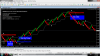
Attachments


- Credits
- 0
OK!
Here you go! I have coded so many EA this week!
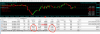
Hi Tanaka and Zaman, have you ever run the EA with 4 pairs together ? , it has a problem when modify the trades, it modified to 1 price level for all pairs like this, I have already set the magic for each pair. Let's see the screenshot.
Attachments

Last edited:
- Credits
- 6
Dear Master Tanaka,
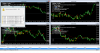
as you can see from my screen shot .. the EA DKX Arrow does not open all the positions as they appear in the "allert" window.
Why does this happen?
And also .. it would be possible to make EA opens, for example trade in "Buy" - that is with a "green" arrow alert, closing it with the red arrow alert.. immediatly opening new operation in "Sell" ?
Wayting for kindly yours.
Thank you so much.
Vincenzo
Attachments
- Credits
- 26
Oh it is because of repaint indi.
- Credits
- 26
Yes, Use order distance is false and close with opposite signal is TrueDear Master Tanaka,
as you can see from my screen shot .. the EA DKX Arrow does not open all the positions as they appear in the "allert" window.
Why does this happen?
And also .. it would be possible to make EA opens, for example trade in "Buy" - that is with a "green" arrow alert, closing it with the red arrow alert.. immediatly opening new operation in "Sell" ?
Wayting for kindly yours.
Thank you so much.
Vincenzo
- Credits
- 26
Can youCan yoic
Can you check all magic number is different?Hi Tanaka and Zaman, have you ever run the EA with 4 pairs together ? , it has a problem when modify the trades, it modified to 1 price level for all pairs like this, I have already set the magic for each pair. Let's see the screenshot.
- Credits
- 6
Yes, Use order distance is false and close with opposite signal is True
Thank you Tanaka! thank you for your kind availability.
- Credits
- 26
Thanks! I will revise manual.Dearest and lovely tanaka akiko san, I have noticed that most of the users here doesn't know about your template or how to use features step by step and so many are confused with additional filters such as ADX etc., and that is the reason they keep on asking either set files or to add additional indicator because they are playing with those filters in the settings assuming if it is mentioned in the settings then it has something to do with but they never get succeed.
I have marked your settings of EA with numbers so u can adjust it accordingly step by step, this will help any user to set their EA, you can modify it and remaining other filters u can mention in the end and turn them False and I totally believe even if you remove them, no one will even ask u to add, only those users will ask who need those settings, your time and effort will be safe, try like this for sometime and lets see if your work stress will reduce or not
View attachment 78494
- Credits
- 0
I'm using fix3 and already changed the magic for each pairDear u r either using OLD EA or u have not changed MAGIC #