• Welcome back! Thank you for being a part of this Traders Community. Let's discuss and share :)
    Selamat datang kembali! Trimakasih telah menjadi bagian dari Komunitas Trader ini. Mari berdiskusi dan berbagi :)

Suggestion I will make a Free EA with your Indicator

Hi, there are so many coding requests and even private mail and I can not answer all of them.
I am almost overload now. I hope someone help to code EA in this thread.

Can anyone help to evaluate the good strategy from all requests in this thread and make priority?

Then please tell me which is good one to worth coding EA.

I want to start from priority high. Thank you for your understanding.:hi:

Your support and a cup of coffee gives me energetic motivation!:blush:


Hello mr.tanaka
Happy to see you again
Can you please send me the eas. Sir

Zaman MA Cross
Zaman Radar
Zanan robot forex
 
Test others too, if you have VPS, put each robot separately on minimum 200-300$ deposit and test them on H4 time frames with the lowest settings. You will love what you see.

Beautiful :inlove:, big thanks to you and mr tanaka. im still learning

Today has the biggest DD since i started. but its not that big..

http://www.myfxbook.com/members/shlord/zaman-martingale-strat-march-2019/3445151

Mr Ahmad, what you mean when you say lowest setting? im setting my vps with EA_ZAMAN SMA2000(removeDOT)

Default
TF H4 balance 200usd EURUSD, lot 0.02, max spread 10..
 

Attachments

  • cprieto15july.jpg
    cprieto15july.jpg
    1 MB · Views: 212
Lowest settings means the settings of robot, not VPS lolx

Well as u r running demo and lot size is rather big, however if u use the same lot on real account, ur heart keep beating high all the time. It's not safe. Use small lot size such as 0.02 - 0.05 maximum.

Thanks for your help.. by any chance you have the last version of BTS Trend? is this one?'

EA_BSTrend(revF1 12 July)?

Regards
 
Mr Tanaka help me make 1 ea again
1. for open position use manual, open sell or buy let us make decition
2. need tp, sl, martin, busket profit, busket stoploss ( use dollar )
3. reverse
4. input lot
thanks bro
 
Lowest settings means the settings of robot, not VPS lolx

Well as u r running demo and lot size is rather big, however if u use the same lot on real account, ur heart keep beating high all the time. It's not safe. Use small lot size such as 0.02 - 0.05 maximum.
What's app pe block mujhe??
 
Dear Tanaka San, please have a look at below picture, something wrong with martingale as I saw error which I never seen before. Instead of proper martingale, it picked as new order and set TP for both incorrect so loss happened.

Used default settings with 0.1 lot, TP = 5 and Martingale = True, 100$

Also when I did some tests separately with Trail start, orders closed on loss only, do I need to have all trail options or best is trail stop instead trail start? Can you please guide me trail start and step option please.


View attachment 93759
View attachment 93760
View attachment 93761
Hi, I tested with every tick mode in the same period.
Sell below.


Total 4 sell orders were modified in the same price and closed with profit.
S
Dear Tanaka San, please have a look at below picture, something wrong with martingale as I saw error which I never seen before. Instead of proper martingale, it picked as new order and set TP for both incorrect so loss happened.

Used default settings with 0.1 lot, TP = 5 and Martingale = True, 100$

Also when I did some tests separately with Trail start, orders closed on loss only, do I need to have all trail options or best is trail stop instead trail start? Can you please guide me trail start and step option please.


View attachment 93759
View attachment 93760
View attachment 93761
Sorry, this may be bug.

Can you test the revised file? I have back-tested and now it looks OK.

upload_2019-8-6_10-58-1.png
 

Attachments

hello Mr. Tanaka, I like this EA.
I have error 1 in BT, can you check it please?
It is at the same time that the order is opened.

I am using Lock Profit with 1% of Balance.
Sorry, I changed code for order modify error. Please test it.

EU M5
upload_2019-8-6_11-18-3.png
 

Attachments

Hi
ok sorry :) I want an expert of this indicator please . thank you very much I have an indicator that gives purchase and sale I want my EA to take the same :) more I want to be able to put sl and tp and TL, ts more if the spread and too high it does not trade schedules start and end and to finish filter news with choice of time to stop trading before the news and after thank you .
for the money management it would be nice if it takes a certain percentage of the account pars position example 1% maximum loss but adjustable and that closes the position if a signal and oppose the first same if sl or tp not touch thank you very much
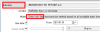
Hi, can you try backtest of indicator?
You will see buy and sell signal is sometimes moving from candle to candle and it may be repaint, that is why I can not get good signal.
upload_2019-8-6_11-31-47.png
 

Attachments

  • upload_2019-8-6_11-31-47.png
    upload_2019-8-6_11-31-47.png
    4.3 KB · Views: 1,040
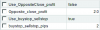
Can anybody please explain the function of this option?
Especially the first two.

View attachment 93446

Thank you.
If you set Use OppsiteClose Profit=TRUE, then only when current order is profit (below is $2), it closed with opposite signal.
If current profit is loss, then even there is opposite signal, it will not closed.
If you use buystop_sellstop, normal order is changed to stoporder (pending order).
You can check with backtest.
upload_2019-8-6_11-45-9.png
 

Attachments

  • upload_2019-8-6_11-45-9.png
    upload_2019-8-6_11-45-9.png
    77.8 KB · Views: 1,095
Dear Tanaka,

I was forward testing EA_3 strategies(revB) on several pairs since Mon.
On Thu, I decided to removed some pairs leaving only EURUSD and GBPUSD and found that Magic number was automatically re-assigned, leaving open orders unmanageable.

For GBPUSD pair, magic number was changed from 107 to 103 but there are still GBPUSD open orders with magic number 107.

Please kindly allow us to have control over the magic number by letting us assign manually .

Thanks.
You can use this version.
 

Attachments

If you set Use OppsiteClose Profit=TRUE, then only when current order is profit (below is $2), it closed with opposite signal.
If current profit is loss, then even there is opposite signal, it will not closed.
If you use buystop_sellstop, normal order is changed to stoporder (pending order).
You can check with backtest.
View attachment 93803
Thank you Sir Tanaka.
So the Opposite_close_profit value is in $$, not pips?
 
Hello Mr. Tanaka,

Last week, i drew your attention to the EA for rectification but up till now you have not responded.
I know you are a very busy man but please, i beg of you, kindly make out time to rectify the EA, i have reattached it again,

my observation

the TP is too small and cannot be adjusted
the TS does not work as programmed
EA does not close trades on opposite
EA sometimes does not trade signals

Please sir, kindly make out time to rectify the EA,, I would be very glad if you did.

Thank you for your generosity.

Kings
Now you can use Opposite close =TRUE.
 

Attachments

Back
Top