- Credits
- 0
Tks my broo!!Hi, I could only get buy & sell signal from the indicator file. So, please put tp/sl by yourself.

Tks my broo!!Hi, I could only get buy & sell signal from the indicator file. So, please put tp/sl by yourself.

Hi, I have FT super arrow indicator revE yesterday. It looks OK for now.It is same issue with TitanX: backtest of Reverse operation shows no issue, but Reverse in Live is not working together with Forward operation.
I hope Mr Tanaka hasn't put this in the "too hard" basket and will not fix it.
At the very least, perhaps migrating TitanX to new template will resolve the issue?
Mr Tanaka please? I can't move to Live without some drawdown protection by using a direct hedge of operations.
Post 1: https://soehoe.id/posts/323352/
Post 2: https://soehoe.id/posts/325393/
Post 3: https://soehoe.id/posts/325393/
Post 4: https://soehoe.id/posts/325709/
Post 5: https://soehoe.id/posts/325964/
Post 6: https://soehoe.id/posts/325973/
Post 7: https://soehoe.id/posts/326109/
Post 8: https://soehoe.id/posts/326207/
Post 9: https://soehoe.id/posts/326350/
Post 10: https://soehoe.id/posts/326405/
Post 11: https://soehoe.id/posts/326643/
This request = Post 12
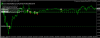
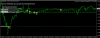

I coded. If you want to martingale, you can use below.Hello tanaka.
see picture.
mcginley dynamic is indicator.
I tested 2017 to 2019 .
100% win.
you can check.
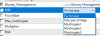

hello Tanaka,I coded. If you want to martingale, you can use below.
View attachment 92567
MM(Money management), you can select fix lot size or variable lot size based of risk percentage.
Martingale 1 is if your order was closed with loss, then next lot size is increased based on multiple.
Martingale 2 is lot size is increased by every oder based on multiplier.
Martingale 3 is lot size is increased linear every order like 0.1-0.2-0.3-0.4-0.5 ...
OK, I changed code.Hi Mr Tanaka san...
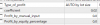
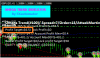
i set TP=35pips, martingale gap = 10pips, i also set Take Profit Type = Auto by LOT Size.
However, the martingale trades not closing when over 35pips, and also not closing even set "Auto by Lot Size"
These martingale trades keep hanging until account blown..
View attachment 92472
View attachment 92473
hello Tanaka,
Martingale 2 and 3 increase the lots when the orders were closed in loss or also when the orders are still opened ?

hi bro..
Thank you very much,Martingale 2 and 3 increase the lots when the orders are still opened!
I used the new template.Dearest tanaka akiko San, please only few changes required.
This version of Radar was posted on 04 April #11603 , please can you make it's BT for faster process.
Also please if you can name new order as "EA Zaman Radar" and for martingale as "Martin Zaman Radar".
Instruction on main face of EA >>> Best for EURUSD H1 Minimum Deposit 500$
Remove breakeven option from the settings and load attached set file as default.
Remove Note 13 completely of time filter.
Also check sometimes it start doing hedge, so please fix it.
Also check it does not set TP and leave order open without TP. In case if trail will also not active and order goes opposite, then martingale starts applying and turn in to high DD.
Last, auto magic number.
No additional changes, rest all perfect and no more addition for any indicator or filter or any option for news etc. Once final file receive, I will share result
Arigato

Kris , I tested but it works.hi bro..
it is like that. correct.
i have an idea.. can we make it in one EA ? this can be done with separate 1-buy and 1-sell max order 1. in that case we can avoid missing reverse order
Oh, it is attack martin.Thank you very much,
can you please see this detail about EA ZAMAN SMA200 too?
in the picture I show a "Marti" EUR-AUD order with 0.20 lots, but the firts order has 0.10 and Marti Multiple = 1, so I think that this order should be of 0.10 too, not 0.20, can you check it please?
Here you go. TGIF.Please, create EA with this indicator
XSupertrend Candle Indicator
It may be promising.
It is necessary to enable the indicator settings, stop loss, take profit, money management. The function of cross-closing orders.
The order should open after the signal candle is closed.
How was last EA? Not profitable?Good Day Sir Tanaka.
Sorry for wasting your energy and time with an unsuccessful strategy came only from my logical thinking.
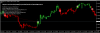
I came across this trend indicator. You should have a look. This trend indicator detects the trend changing sooner then other indicator i know even MACD.
I attach the image comparing HalfTrend MTF with alerts with trend-finder-indicator.
Trend-finder-indicator seems giving more accurate and early signal for trend change.
So i came with a new strategy. Hoping this time it will definitely be successful and profitable.
I am using MM with Risk = 1 and fix lot 0.20Oh
Oh, it is attack martin.
You need to change fix lot =0.2, then initial lot is 0.2
All this time i was looking for this kind of indicator to make friend with. From what i see, i found it. I make a comparison with other trend indicator for you to judge, to evaluate this indicator. I hope you can see what i see if it really do like what it suppose to. If you can see the logic in it, i hope you can make this one for me. Thank you so much for your effort.How was last EA? Not profitable?
Are you sure that this one is good?
The last ea should be ok, only the bad decision i've made is choosing rsi as the trade stopper.How was last EA? Not profitable?
Are you sure that this one is good?
and you need this copy tool
Can you test not every tick.Tanaka, Please Toggle Comments on Chart on
Zaman MA Cross EA
and
EA_Zaman forex robot january 2019 , to BT
It Takes So many Time to BT
Thanks in Advance