- Credits
- 0
What is the latest version of EA_super_arrow_indicator(NRP) available? Can someone post here. I am looking for $ value to close all open position.


In my eyes no so interesting cause every pair has a very different setting...but pm me for test!
Goodnight
You could do something with this EA is a good EA but only use for a few days.
A phone number comes out to contact the owner of this EA..Sincerely is not the owner.
I think you can unlock so everyone can try and earn money.
It has a very low DD and gives good results daily.
Maybe this EA has been created here, I honestly do not know.
You already communicate Reteid)
Regards


I checked entry logic for revC1, it is not RSI logic.... I wonder who requested this revC?Modification request:
Deaest tanaka akiko San, beloe was designed from my x-friend and I requested you to add some setting options on 25 Jan 2019 >>> #6945. please can you change screen text like below.
View attachment 89519
Please do not change anything else. Also for main order, comments should be " Zaman Forex Robot" and for martingale, comments should be " ZFR Martin ". Also please add my sessions indicator.
Also please remove all other settings except below mentioned and set below as default,
View attachment 89522
View attachment 89523
Once the changes will be done, I will share set file for below result for other members.
View attachment 89521
Thank you so much in advance
I just copied Rev C logic. Please use this.Tanaka San, thank you o much for the nice work.
use t
Please find below set file for the previous version which you can also use with the new version.
In previous, result is excellent however in new version, account blows very fast. Kindly can you check what is the reason.
EURUSD D1 from Jan 2019 up to now.
OK. I coded.Yes Tanaka that is correct, trendsignals to open, and when the FxMath signals the opposite direction the order to close.
If the FxMath is opposite to the new trendsignal then don't open.
So agreement, for them, only open with trendsignal and close with FxMath.
If it is easier to have them operate exclusively in agreement that will still work, it might be better.
FxMath usually signals first.
If you could set as default these input values it would be nice in FxMath.
pCCI_21 11
pLongConsty_22 -97.369995
pShortConsty_22 97.36995
Thanks you for your cofee.View attachment 89630
Hi, tanaka akiko , please code simple EA for this indicator
Style: Single or Grid
Maxoder: 7T
Target Profit: 3%
StopLoss: 57 pips
start trailling: 27 pips
Trailling Step: 07 pips
lots: 0.01
auto lot: True/False (400$ = 0.o1)
Grid Distance: 5 pips
Opposite Close: True/False
When the arrow appears, open the order
If style is Single only 1 oder opened
If Style is Grid then
Open 1 Buy and 7 Buy Stop, 7 Buy Limit
Or Open 1 Sell and 7 Sell Stop, 7 Sell Limit
The distance between orders is Grid Distance.
When max oder then cancel all pending oders.
Trailling stop for All oders
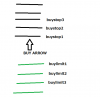

When the arrow appears, the order will immediately open and open 07 oders litmied and 07 oders stop and if Toal open Oderss = Max then Cancel all pending oders.
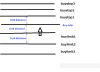

Max Grid oders = 7When the arrow appears, the order will immediately open and open 07 oders litmied and 07 oders stop and if Toal open Oderss = Max then Cancel all pending oders.
And add para Max Grid oders = 7
View attachment 89644
Correct, but cancel All pending oders when Max 7 trade openedMax Grid oders = 7
but you have 7 buylimit and 7 buystop, so you have 14 orders + normal buyorder =15 orders?
Max7 means buyorder & sell order,right?Correct, but cancel All pending oders when Max 7 trade opened
Only The Buy or Sell orders at the same timeMax7 means buyorder & sell order,right?
pending order is opened mex 14, right?
pending order is changed to buy or sell order, then you count total order and if it is 7 max, delete all pending.
It is repaint, but are you OK?Correct, but cancel All pending oders when Max 7 trade opened
But Max Grid can change by setting
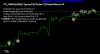
Please edit info like Zaman
I coded.View attachment 89630
Hi, tanaka akiko , please code simple EA for this indicator
Style: Single or Grid
Maxoder: 7
Target Profit: 3%
StopLoss: 57 pips
start trailling: 27 pips
Trailling Step: 07 pips
lots: 0.01
auto lot: True/False (400$ = 0.o1)
Grid Distance: 5 pips
Opposite Close: True/False
When the arrow appears, open the order
If style is Single only 1 oder opened
If Style is Grid then
Open 1 Buy and 7 Buy Stop, 7 Buy Limit
Or Open 1 Sell and 7 Sell Stop, 7 Sell Limit
The distance between orders is Grid Distance.
When max oder then cancel all pending oders.
Trailling stop for All oders

1. buy order and sell order at the same time.mr tanaka thank you very much for your help...
i have one simple request.
immeadiately upon start,
1 ea will open buy and sell order.
2 when a position is closed, ea will open another buy and sell order.
3. rinse and repeat.
4. take profit and stoploss are trader preferences.
-- if possible add an option to "buy only" or "sell only" when a position is close
thank you....
sort of grid ea..
Hi, I have checked your demo account and it is wonderful!EA ARROW123 WORKING SUPERB NOW
THANKS AKIKO
LOGIN. 30404163
PWD. icm123
SERVER. ICMarkets-Demo03
THANKS TO AKIKO


The VPS is $25 for one year or for one month?