
You are using an out of date browser. It may not display this or other websites correctly.
You should upgrade or use an alternative browser.
You should upgrade or use an alternative browser.
Suggestion I will make a Free EA with your Indicator
- Thread starter winidecorw
- Start date

or anybody genius thread member can do the big job here?
already done for you.coffee and credit go to the programmer Tanaka!
Attachments

- Credits
- 0
here:
Hello master Tanaka,
Can you fix this EA. 'np' - illegal switch expression type ZUPMY3_1.mq4 442 11
/ Òóò íàäî ïîëó÷èòü ïàòòåðí èç íàøåãî èíäþêà ñ ïîìîùüþ iCustom
double da=iCustom(Symbol(), 0, "ZUP_my",3,0);
double np=iCustom(Symbol(), 0, "ZUP_my",3,4);
if ((da==1)&&(TBGartley))
{
vBull=iCustom(Symbol(), 0, "ZUP_my",3,1);
PC=iCustom(Symbol(), 0, "ZUP_my",3,2);
PD=iCustom(Symbol(), 0, "ZUP_my",3,3);
{
switch (np)
{
case 1 : {vNamePattern = "Gartley"; break;}
case 2 : {vNamePattern = "Bat"; break;}
case 3 : {vNamePattern = "Batterfly"; break;}
case 4 : {vNamePattern = "Crab"; break; }
}
}
Attachments
- Credits
- 0
Just learn to write a senseful request.....and THEN come back here....hi retarded2222,
his name is falah, means successful person in arabic, falalala means a slur in your stupid racist brain!
why you just go back hanging around with your fascist genetic defect german friends and leave us alone! no doubt, there are many places in internet today, where sick like minded
people like you feels sooo good! just go!

wow! so Fast n Furious!already done for you.coffee and credit go to the programmer Tanaka!
does it work exactly like my idea?
i not a forex analyst. i'm just looking at the logic from the movement of line in this indi.
do you think this strategy can work and make profit?
- Credits
- 0
The indicator is nothing cracked by the guy who proclaims this...Simply downloaded and set the settings to 80:hi. it seems like you have a knowledge to code an EA, is it?
have you check the indi i attached in my previous post? can you read and identify the indi setting for that Special Indicator i found? can you create new EA with that as a guide?
https://www.mql5.com/de/code/13017
Slope Direction Line
And in my opinion it is to lesss for a strategy.....
It is simple a variation of an ma.....
do you mean it will not be too profitable?The indicator is nothing cracked by the guy who proclaims this...Simply downloaded and set the settings to 80:
https://www.mql5.com/de/code/13017
Slope Direction Line
And in my opinion it is to lesss for a strategy.....
It is simple a variation of an ma.....
do you mean it will not be too profitable?
try it yourself and find out the right setting for yourself! this is the only way forex works!
The indicator is nothing cracked by the guy who proclaims this...Simply downloaded and set the settings to 80:
https://www.mql5.com/de/code/13017
Slope Direction Line
And in my opinion it is to lesss for a strategy.....
It is simple a variation of an ma.....
copy from mql5 site.
Input Parameters:
- period = 32 — The indicator period for the subsequent moving average calculations.
- FilterNumber = 2 — Applied filter size.
- ma_method = 3 — Averaging method. Can be any of the Moving Average method values: 0 — SMA (Simple Moving Average), 1 — EMA (Exponential Moving Average), 2 — SMMA (Smoothed Moving Average), 3 — LWMA (Linear-weighted Moving Average).
- applied_price = 0 — Used price. Can be any of price constants: 0 — CLOSE, 1 — OPEN, 2 — HIGH, 3 — LOW, 4 — MEDIAN ((high+low)/2), 5 — TYPICAL ((high+low+close)/3), 6 — WEIGHTED ((high+low+close+close)/4).
* where to put the setting to 80?
yes maam!!try it yourself and find out the right setting for yourself! this is the only way forex works!
Just learn to write a senseful request.....and THEN come back here....
Just learn to write a senseful request.....and THEN come back here....
are you using google translator:senseful request!!!
a fact proven to be true to me almost daily: you can not be racist and in same time intelligent. do not work!


any time sir!!yes maam!!
since when is this??original post
- Credits
- 0
In the settings of the indicator....copy from mql5 site.
Input Parameters:
- period = 32 — The indicator period for the subsequent moving average calculations.
- FilterNumber = 2 — Applied filter size.
- ma_method = 3 — Averaging method. Can be any of the Moving Average method values: 0 — SMA (Simple Moving Average), 1 — EMA (Exponential Moving Average), 2 — SMMA (Smoothed Moving Average), 3 — LWMA (Linear-weighted Moving Average).
- applied_price = 0 — Used price. Can be any of price constants: 0 — CLOSE, 1 — OPEN, 2 — HIGH, 3 — LOW, 4 — MEDIAN ((high+low)/2), 5 — TYPICAL ((high+low+close)/3), 6 — WEIGHTED ((high+low+close+close)/4).
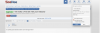
* where to put the setting to 80?
since when is this??
see the image below my son
Attachments

- Credits
- 11
I used the latest Tanaka template adn I added a new function.Okay, You can do that if you feel that might work, you have much experience than me so if you think that might work just do it and let me know, I will test it.
The recent delivery was nice for me while it was profitable without trailing stop idea because that doesn't works I had success with Fixed TP: 100 Points and Fixed SL: 200 Points. But what I had noticed is when it starts making a loss it may make 2-3 times or more losses at the same time, and the exact reason was maybe the market was under a retracement or in a sideways movement or a small trend.
Note: The strategy itself is profitable, And now I'm thinking to cut out the losses if possible adding some more filters maybe. I hope you understand the situation, if you do some visual simulations you will understand!
- 1. Give me a copy of your filters, ideas, additions that you love to do for this ea with fixing the trailing stop idea, while it's moving the SL to breakeven. SL shouldn't move and TP should be locked at 100 points and later everything is a bonus point.
- 2. Give me a copy of my idea which is ban for 24 hours and automatically starts after the exact time with fixed TP:100 and SL: 200 just modification of the recent one you delivered.
- 3. Send me the .mql4 source file here or inbox.
Great to know that you loved the coffeeI hope I can send every week continuously...
If the order was closed with loss, then EA will be paused for xx hours and restart again.

Attachments

- Credits
- 11
Yes, we have two lot multiple.Dear Tanaka. Here the backtest on default settings, TF M5, 4 pairs. 4 month, sorry but I haven't tiskdatasuite so they aren't 99.9% quality.
As you can see with 0.10 lot on 10000 cent 3 pairs failed (only EJ passed the test).
I have a question, I see that in default Lot Multiple is "Linear" and Martin Multiple "2.0". How it works? I see that the EA has a Lot Multiplier of 1.2 (not 2.0 as shown or maybe I don't understand these options). How can modify it for example 1.1 or 1.4?
Let me know, Thanks.
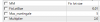
Below is normal order lot (indicator buy/sell signal).
and below is about attack martin multiple.
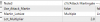
These are different.
For example,
Lot Multiple is "Linear"
Your lot size changes (increases) linear.
Martin Multiple "2.0" means
your attack martin (additional orders after xx pips distance) lot size changes (increase) x 2.0, like 0.1-0.2-0.4-0.8----
Attachments


Last edited:
Thamira Gunaratne
New Member
- Credits
- 0
GoodArrowIndicator is not working in Cents account

Yes, we have two lot multiple.
Below is normal order lot (indicator buy/sell signal).
View attachment 84837
and below is about attack martin multiple.
View attachment 84838
These are different.
For example,
Lot Multiple is "Linear"
Your lot size changes (increases) linear.
Martin Multiple "2.0" means
your attack martin (additional orders after xx pips distance) lot size changes (increase) x 2.0, like 0.1-0.2-0.4-0.8----
Sir you can manage my account... I research good EA but not get good EA if you manage my account 50% share profit I send you detail