Appreciate your try sir.FA, I checked your indicator but this indicator has no arrow signal buffer. I think this is drawing arrow type indicators , so I can not make it EA.

You are using an out of date browser. It may not display this or other websites correctly.
You should upgrade or use an alternative browser.
You should upgrade or use an alternative browser.
Suggestion I will make a Free EA with your Indicator
- Thread starter winidecorw
- Start date

- Credits
- 11
ask for help from the EA masters
tanaka akiko
I have an indicator in this forum and it is very useful.
crossover indicator material,
Logically:
sell order
if the arrow in H4 / D1 appears Sell (yellow) then in each arrow appears m5 sell order and close all order if H4 appears buy arrow (blue).
Buy order is reversed from sell.
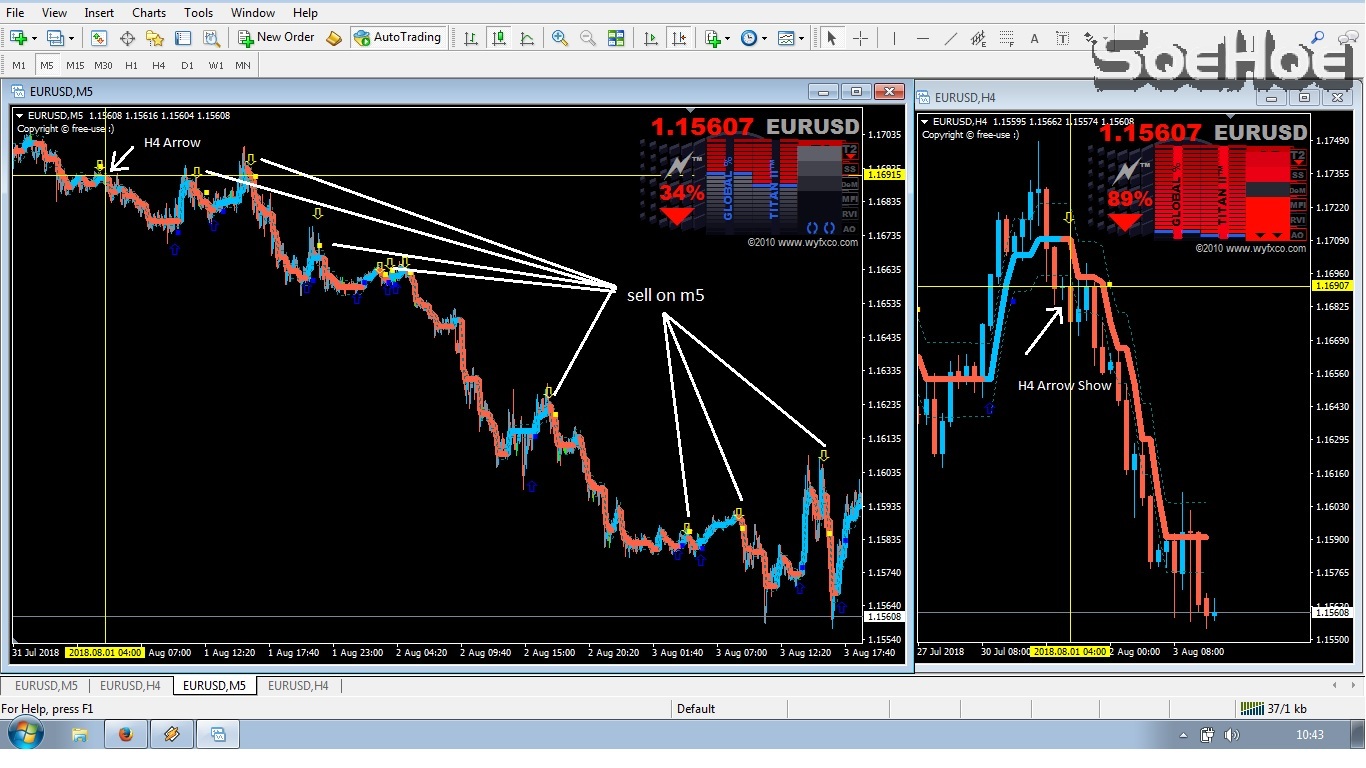
Sorry, I checked the indicator buffer signals and signal timing and SELL/BUY arrows timing are so different and can not make EA...
Maybe this is re-painting?
Attachments


yeah its be hard for me because I never use stoploss just manual open and close order.Sorry, I checked the indicator buffer signals and signal timing and SELL/BUY arrows timing are so different and can not make EA...
Maybe this is re-painting?
10q tanaka.
- Credits
- 11
Anyone has no-repaint and good indicators?
I think if re-paint, there are so many fake signals and the result is not good .
Also if the indicator has no buffer signals, I can not converte into EA.
If possible, if you already have good profit with manual trading, it is worth to making EA.
Thank you for your understanding.
I think if re-paint, there are so many fake signals and the result is not good .
Also if the indicator has no buffer signals, I can not converte into EA.
If possible, if you already have good profit with manual trading, it is worth to making EA.
Thank you for your understanding.
Wow fast respon. I will thinking about logical for this. nice talk with you Tanaka.Anyone has no-repaint and good indicators?
I think if re-paint, there are so many fake signals and the result is not good .
Also if the indicator has no buffer signals, I can not converte into EA.
If possible, if you already have good profit with manual trading, it is worth to making EA.
Thank you for your understanding.
Sorry this is very complicated and hard for me to make complete EA.
Can you make it more simple?
OK. what can make it easier?
what if the buy/sell panel can be added with true/false instead.
And let me know what else is very difficult?
Thank you for your reply btw
Sorry this is very complicated and hard for me to make complete EA.
Can you make it more simple?
Also maybe remove the idea of managing all open orders at once and maybe instead use a magic number
Let me know what else will make it easier?
Also maybe remove the idea of managing all open orders at once and maybe instead use a magic number
Let me know what else will make it easier?
However let the ea to manage a buy and a sell (hedging) on the same chart ie same magic number, or does that not work?

- Credits
- 0
hi mr tanaka .. kindly need help to build my strategy to an EA
strategy should work only on 1 mint
1 mint TF 3 HTF Heikan ashi base strategy ( gird )
i should be able to choose single lot or grid system
trades should open with market orders , not pending orders
if i should attach EA with 16 pairs , i should be able to close all open grid trades or only that pair trades ( button on chart close all trades and 2nd button close only this pair trades)+ i should get info panel , which will show total pairs open trades and single pair open trades and total profit /loss <<< (these things can be in simple panel then also fine , information is important not GUI )
suppose i was watching live manual strategy , and i saw i want to enter right now , then if i want to enter in trade pair by manual , i should put manual buy/sell trade and EA should start grid according to strategy rule
EA only should close with close position or close when TP hit untill that EA shoudl continue to enter in trades, doesnt matter how much lots enter in account
EA should only start trading , when new signal should appear , EA will not open trades when i should attach it with chart ( only if i wanna enter manually )
stoploss , entry , close position , TP every thing should be according 1st trade of grid <<< ( means EA open 40 trades of grid , i put 50 pips TP , that should be according to 1st trade of grid , when price should move +50 pips according to 1st trade of grid , all 40 trades should be closed )
EA should close all grid trades instantly
suppose i close one trade of running Grid manually , EA should close all running trades of that pair
suppose i enter one trade manually , then EA should start grid trading
EA should trade on 1 mint TF , and HEikan ashi Time frames should be 1 HTF , 2nd HTF 3rd HTF
Manul SL , close position Manual TP Auto Break even after x Pips true /false
--------------------------overview---------------------------
single trade entry or grid
on chart button >>>> close all pairs 2nd close this pair and info panel even in text
manual sl , close position , manual TP
manual enter in trade >> start grid , manual close trade >>>>close grid
special EA properties
equity stop
time filter
thanks so much for you attention
strategy should work only on 1 mint
1 mint TF 3 HTF Heikan ashi base strategy ( gird )
i should be able to choose single lot or grid system
trades should open with market orders , not pending orders
if i should attach EA with 16 pairs , i should be able to close all open grid trades or only that pair trades ( button on chart close all trades and 2nd button close only this pair trades)+ i should get info panel , which will show total pairs open trades and single pair open trades and total profit /loss <<< (these things can be in simple panel then also fine , information is important not GUI )
suppose i was watching live manual strategy , and i saw i want to enter right now , then if i want to enter in trade pair by manual , i should put manual buy/sell trade and EA should start grid according to strategy rule
EA only should close with close position or close when TP hit untill that EA shoudl continue to enter in trades, doesnt matter how much lots enter in account
EA should only start trading , when new signal should appear , EA will not open trades when i should attach it with chart ( only if i wanna enter manually )
stoploss , entry , close position , TP every thing should be according 1st trade of grid <<< ( means EA open 40 trades of grid , i put 50 pips TP , that should be according to 1st trade of grid , when price should move +50 pips according to 1st trade of grid , all 40 trades should be closed )
EA should close all grid trades instantly
suppose i close one trade of running Grid manually , EA should close all running trades of that pair
suppose i enter one trade manually , then EA should start grid trading
EA should trade on 1 mint TF , and HEikan ashi Time frames should be 1 HTF , 2nd HTF 3rd HTF
Manul SL , close position Manual TP Auto Break even after x Pips true /false
--------------------------overview---------------------------
single trade entry or grid
on chart button >>>> close all pairs 2nd close this pair and info panel even in text
manual sl , close position , manual TP
manual enter in trade >> start grid , manual close trade >>>>close grid
special EA properties
equity stop
time filter
thanks so much for you attention

Hi, sorry in my English I use a Gugl translator.Extravagant source code for EA....helping very much...
And of course the indicator is attached....that s how we like it here...
And every 2 months the same request here...don t forget to ask in august again....


The indicator I'm using is the Pipfinite trend laser and it's not free. On my request, the seller of that indicator sent me the basic code for creating the EA, which I sent in the attachment. I really do not get into programming, and I do not know if with that basic code it's possible make Ea, that's what I'm trying to find out and that's why I post the same post for the third time on the forum.
Regarding the strategy for trading the idea is that this EA opens and closes positions at a 15 min chart according to the indicator, but only if the signal is the same as on a 1h chart.
I apologize if I was boring and if I offended anyone on this forum, I will not repeat the same post in August.
- Credits
- 11
SE, I made it simple. Unfortunately, MBFXTiming yellow line and green & orange line has the same buffer signal, so it can not be separated.However let the ea to manage a buy and a sell (hedging) on the same chart ie same magic number, or does that not work?
So I just used the value to compare if it is below 30 or above 70.
If M15 chart value is below 30&& M5 chart value is also below 30, then buy
If M15 chart value is above 70&& M5 chart value is also above 70, then sell
You can change TF M15 in parameter setting and TF for entry signal also. The time frame you attached the EA is used for entry signal for MBFXTiming indicator.
I made it simple and close logic is just used Trailing stop.
Please test it.
Attachments
- Credits
- 11
This EA has SL, how is it set? Auto?Hi sir Tanaka can you add SL option parameter to this EA.. thanks in advance
Hi Antonio, may you share setting for EA Jokowin Mega Profit?
- Credits
- 11
Hi, I coded. I added "RoNz Auto SL-TS-TP v2.06" into the EA.its auto cant edit can you modify to have option so big sl
You can put SL/TP and you can also hide SL/TP, and trailing stop and others. About RoNz settings, please see the link.
Please test to compare which is better.
By the way this EA seems to be working only TF=M15 and currency pairs is limited. If you want to make it work in all pairs, I will try.
Attachments


- Credits
- 0
Start test 25/07/2018Does anyone test ZUP150 ? how about your result?


Attachments


see my pm message pleaseNow, sir, you can set up the maximum single. However, I need to add the set of interval settings and mobile stop setting in EA.
Thank you.

Start test 25/07/2018View attachment 52593 View attachment 52594
Yes but one news event and it will wipe out your account
If a news filter can be coded with this EA,it will become a monster