• Welcome back! Thank you for being a part of this Traders Community. Let's discuss and share :)
    Selamat datang kembali! Trimakasih telah menjadi bagian dari Komunitas Trader ini. Mari berdiskusi dan berbagi :)

New EA DeepGold LLM EA – when gold listens to artificial intelligence (well, almost)

NPNavigator

Member
Credit Hunter
Credits
761
Hello, colleagues!

I used to post quite classic Expert Advisors here – indicator, martingale, grid… But this time I was carried away towards neural networks and large language models. Why? Yes, because there are no such advisers on the forum, and the topic is wildly interesting. I wanted to understand if LLM (in my case DeepSeek) can really help in trading, or if it's just a HYPE.

This is how DeepGold LLM EA was born, a robot that sends a "market snapshot" directly to the DeepSeek cloud neural network every 15 minutes (and with sudden movements), and it returns a forecast: buy, sell or stand aside. And yes, he trades only in gold (XAUUSD) and strictly on M15 – no amateur activity.

What's under the hood? Key features

• A living AI brain - the Expert Advisor collects a lot of data: ATR, ADX, RSI, CCI, Bollinger bands, volumes, the last 30 candlesticks of M15, open positions, the current P&L, and even the history of its past forecasts with a "guessed/not guessed" rating. All this goes to the DeepSeek server, and the model returns a number from 0 (furious SELL) to 1 (confident BUY) along with a confidence score.

• Protection against "nonsense" – if the confidence is below the set threshold (65% by default), the transaction is not opened. This is how we cut off weak signals.

• Dual stop system – you can use real StopLoss / TakeProfit or virtual stops (so as not to give them to the broker), as well as a trailing stop, taking into account the average price of all positions.

• Smart risk management – the risk per trade is calculated from the balance, there is a daily loss limit (by default, 5% – and trading freezes until the next day), maximum spread, Spike Filter, protection against cascading entry through the ATR distance.

• Schedule and timezones – you can set the UTC trading hours (so as not to get into the Asian "mess"), as well as compensate for the server time offset.

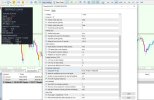
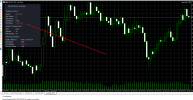
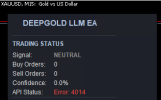
• Own dashboard – a window with the current signal, number of orders, AI confidence, API status, ATR, spread, equity and drawdown is displayed on the chart. Everything is clear, without unnecessary graphics.

• Self–learning (almost) - the EA remembers its forecasts and checks after a set number of bars whether they have come true, transmitting this feedback in the following queries. This is how the model sees its mistakes and adjusts.

• Live only – it won't work in the strategy tester (I specifically blocked it), because it's pointless without a real connection to the API.

Recommendations for use (highly recommended!)

1. Start with a demo account. Even if you are an MQL5 guru, this advisor is an experiment. Let him run for a couple of weeks without risking any hard money.

2. Get the DeepSeek API key. They give you a decent amount of free tokens, but if you want to actively send requests, you may need to top up your balance. Insert the key into the parameters.

3. Adjust the trading time to your UTC. The default time is 9-23 UTC, which roughly covers the European and American sessions. Check if the server time matches.

4. Take a risk on the deal – don't be greedy. 1% at a stop of 400 pp is quite a working option for the test. If you set 5% or higher, the daily limit will work quickly in case of a series of losses.

5. Do not change the timeframe and symbol. The robot is rigidly attached to the XAUUSD M15, it will simply refuse to work on other instruments (it will issue an Alert).

6. Keep an eye on the instrument panel. If the API status is red, check the Internet or the token balance.

7. The Advisor is not the "Grail". This is an assistant that uses a probabilistic approach. The model can be wrong, the market is an unpredictable thing. Treat it like an advanced assistant, not like a magic "loot" button.

The advisor is accompanied by detailed instructions describing each parameter and the logic of its operation. Download, try, and share your impressions. I will be glad for any feedback, especially from those who are already experimenting with LLM in trading.

If you have any ideas on how to improve the "brains" – write. Perhaps we will add support for other providers (OpenAI, Claude) or more sophisticated strategies.

Good luck and profits!
 

Attachments

Hello, colleagues!

I used to post quite classic Expert Advisors here – indicator, martingale, grid… But this time I was carried away towards neural networks and large language models. Why? Yes, because there are no such advisers on the forum, and the topic is wildly interesting. I wanted to understand if LLM (in my case DeepSeek) can really help in trading, or if it's just a HYPE.

This is how DeepGold LLM EA was born, a robot that sends a "market snapshot" directly to the DeepSeek cloud neural network every 15 minutes (and with sudden movements), and it returns a forecast: buy, sell or stand aside. And yes, he trades only in gold (XAUUSD) and strictly on M15 – no amateur activity.

What's under the hood? Key features

• A living AI brain - the Expert Advisor collects a lot of data: ATR, ADX, RSI, CCI, Bollinger bands, volumes, the last 30 candlesticks of M15, open positions, the current P&L, and even the history of its past forecasts with a "guessed/not guessed" rating. All this goes to the DeepSeek server, and the model returns a number from 0 (furious SELL) to 1 (confident BUY) along with a confidence score.

• Protection against "nonsense" – if the confidence is below the set threshold (65% by default), the transaction is not opened. This is how we cut off weak signals.

• Dual stop system – you can use real StopLoss / TakeProfit or virtual stops (so as not to give them to the broker), as well as a trailing stop, taking into account the average price of all positions.

• Smart risk management – the risk per trade is calculated from the balance, there is a daily loss limit (by default, 5% – and trading freezes until the next day), maximum spread, Spike Filter, protection against cascading entry through the ATR distance.

• Schedule and timezones – you can set the UTC trading hours (so as not to get into the Asian "mess"), as well as compensate for the server time offset.

• Own dashboard – a window with the current signal, number of orders, AI confidence, API status, ATR, spread, equity and drawdown is displayed on the chart. Everything is clear, without unnecessary graphics.

• Self–learning (almost) - the EA remembers its forecasts and checks after a set number of bars whether they have come true, transmitting this feedback in the following queries. This is how the model sees its mistakes and adjusts.

• Live only – it won't work in the strategy tester (I specifically blocked it), because it's pointless without a real connection to the API.

Recommendations for use (highly recommended!)

1. Start with a demo account. Even if you are an MQL5 guru, this advisor is an experiment. Let him run for a couple of weeks without risking any hard money.

2. Get the DeepSeek API key. They give you a decent amount of free tokens, but if you want to actively send requests, you may need to top up your balance. Insert the key into the parameters.

3. Adjust the trading time to your UTC. The default time is 9-23 UTC, which roughly covers the European and American sessions. Check if the server time matches.

4. Take a risk on the deal – don't be greedy. 1% at a stop of 400 pp is quite a working option for the test. If you set 5% or higher, the daily limit will work quickly in case of a series of losses.

5. Do not change the timeframe and symbol. The robot is rigidly attached to the XAUUSD M15, it will simply refuse to work on other instruments (it will issue an Alert).

6. Keep an eye on the instrument panel. If the API status is red, check the Internet or the token balance.

7. The Advisor is not the "Grail". This is an assistant that uses a probabilistic approach. The model can be wrong, the market is an unpredictable thing. Treat it like an advanced assistant, not like a magic "loot" button.

The advisor is accompanied by detailed instructions describing each parameter and the logic of its operation. Download, try, and share your impressions. I will be glad for any feedback, especially from those who are already experimenting with LLM in trading.

If you have any ideas on how to improve the "brains" – write. Perhaps we will add support for other providers (OpenAI, Claude) or more sophisticated strategies.

Good luck and profits!
am trying to attach to my mt5 and its not working what might be the issue
 
am trying to attach to my mt5 and its not working what might be the issue
Hi!

First of all, carefully read the instructions that came with the kit. Everything is chewed up there, including the most frequent rakes that beginners step on. Honestly, 90% of the problems are caused by skipping this step.

And now, in fact: without an API key, the adviser will not work at all. It doesn't take signals from the ceiling, but actually knocks on the DeepSeek cloud neural network. If the DeepSeekApiKey field is left empty, the robot will simply refuse to start and honestly write "FATAL: DeepSeek API key missing" to the log.

How to get a key:

1. Go to the website platform.deepseek.com — this is the official portal of DeepSeek developers.

2. Register (you can use a Google account if you are too lazy to enter your email).

3. After logging in, go to the API Keys section (usually in the menu on the left).

4. Click "Create new secret key", give it any name (for example, "MT5_EA").

5. Copy the key immediately! It is shown only once, and then you will not be able to restore it. You will have to generate a new one.

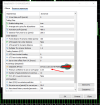
6. Insert this key into the DeepSeekApiKey parameter in the MT5 Expert Advisor settings.

An important point: DeepSeek gives new users free tokens, but their number is limited. If the ADVISOR has been working for a while and then stopped, check the balance in your personal account. Maybe the freebie is over and you need to top up your account.
 

Attachments

  • DeepGold01.jpg
    DeepGold01.jpg
    201.4 KB · Views: 18
Hi!

First of all, carefully read the instructions that came with the kit. Everything is chewed up there, including the most frequent rakes that beginners step on. Honestly, 90% of the problems are caused by skipping this step.

And now, in fact: without an API key, the adviser will not work at all. It doesn't take signals from the ceiling, but actually knocks on the DeepSeek cloud neural network. If the DeepSeekApiKey field is left empty, the robot will simply refuse to start and honestly write "FATAL: DeepSeek API key missing" to the log.

How to get a key:

1. Go to the website platform.deepseek.com — this is the official portal of DeepSeek developers.

2. Register (you can use a Google account if you are too lazy to enter your email).

3. After logging in, go to the API Keys section (usually in the menu on the left).

4. Click "Create new secret key", give it any name (for example, "MT5_EA").

5. Copy the key immediately! It is shown only once, and then you will not be able to restore it. You will have to generate a new one.

6. Insert this key into the DeepSeekApiKey parameter in the MT5 Expert Advisor settings.

An important point: DeepSeek gives new users free tokens, but their number is limited. If the ADVISOR has been working for a while and then stopped, check the balance in your personal account. Maybe the freebie is over and you need to top up your account.
Good afternoon ,Give me your key for a try!
 
Good afternoon ,Give me your key for a try!
Let's be honest: giving your API key is like giving you your wallet with the words "use it and return it." It sounds friendly, but it's not really done that way. Firstly, the key is linked to my account and billing information. Secondly, this is unacceptable from a security point of view. So I'm sorry, but no offense, I still have the key.

Now to the point: if it doesn't work with your keys, it means there's a mistake somewhere, not "the keys are wrong."

Let's take it one step at a time, as I've already written.:

1. Is the key copied completely, without spaces at the beginning/end? Try to paste it into a notebook and check it.

2. Check the token balance in DeepSeek's personal account. Even if the key is new, it happens that no free tokens are credited.

I understand that I want the magic "it's working" button, but it's like with a car: no matter how much you ask your neighbor for the keys to his car, yours won't start if you don't fill up the gasoline.
 
Let's be honest: giving your API key is like giving you your wallet with the words "use it and return it." It sounds friendly, but it's not really done that way. Firstly, the key is linked to my account and billing information. Secondly, this is unacceptable from a security point of view. So I'm sorry, but no offense, I still have the key.

Now to the point: if it doesn't work with your keys, it means there's a mistake somewhere, not "the keys are wrong."

Let's take it one step at a time, as I've already written.:

1. Is the key copied completely, without spaces at the beginning/end? Try to paste it into a notebook and check it.

2. Check the token balance in DeepSeek's personal account. Even if the key is new, it happens that no free tokens are credited.

I understand that I want the magic "it's working" button, but it's like with a car: no matter how much you ask your neighbor for the keys to his car, yours won't start if you don't fill up the gasoline.
Can you provide an account monitoring system to see how it trades or at least a screenshot of the trades? Thanks.
 
Oh! "Error: 402" is already concrete, which means it's more fun!

The 402 error in the API world is like a waiter in a restaurant who politely hints: "Sir, you are beautiful, of course, but there is no money in the account." Technically, this means "Payment Required" — your DeepSeek account has run out of free tokens or the trial period has expired, and now the neural network wants to be fed.

The good news: The advisor itself and the key are working correctly, otherwise there would be a 401 error (wrong key) or silence altogether. The problem lies precisely in the balance.

What to do:

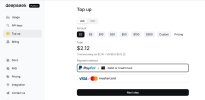
1. Go to your personal account on platform.deepseek.com .

2. Find the Top up section.

3. Look at the token balance. If it's zero—based, that's the culprit.

4. Top up your account. There are different tariffs, but a minimum of $2 is enough to get started.

So don't worry — the advisor is alive, he just wants to eat. Replenish the balance, and he will start predicting gold again, like a shaman after a ritual treat.
 

Attachments

  • DeepGold02.jpg
    DeepGold02.jpg
    59.7 KB · Views: 11
sk-10affdd24d28494eb189f52c48c69c67 that is my key and it not working
The key is working. He's not the problem. Open your eyes wider and look at the error code in the panel: "Error: 402".
And now pay attention — we are reading more carefully, because I have already analyzed this error literally in the post above.
402 = Payment Required, which, translated from IT to human, means: "Hey, buddy, put money in the account, and I'll make money." You just ran out of tokens on your DeepSeek account. The free ones have ended, the paid ones have not been added — the neural network has declared a hunger strike.
So do this:
1. Log into your personal account platform.deepseek.com
2. Look at the balance — I'm sure there is zero or an inscription like "insufficient funds".
3. Replenish the account to the minimum ($ 2 is enough for the eyes to trade).
4. The ADVISOR will immediately come to life, you don't even need to recreate the key.
Please read the discussion in full, and don't jump over the posts. I'm happy to help, but rewriting the same thing in neighboring messages is like playing "broken phone" with yourself.
 
For XAUUSD robots, I usually check whether the strategy depends on trend strength, spread widening, and session timing. A backtest alone can look good, but forward testing should confirm whether entries survive real broker execution, especially during news and low-liquidity hours. What conditions are you using to decide when the robot should stop trading?
 
HTTP error: 400 response: Failed to parse the request body as JSON:
messages[0].content: invalid unicode code point at line 1 column 1449


PN 0 18:48:03.804 DeepGold EA (XAUUSDc,M15) DeepGold EA removed. Reason: 5
QJ 0 18:48:03.805 DeepGold EA (XAUUSDc,M15) DeepGold EA initialized — LIVE LLM MODE (DeepSeek)
HO 0 18:48:03.805 DeepGold EA (XAUUSDc,M15) Account Balance: $16402.00
CR 0 18:48:03.805 DeepGold EA (XAUUSDc,M15) Max Daily Loss: $2460.30 (15.0%)
LF 0 18:48:04.790 DeepGold EA (XAUUSDc,M15) API connection test successful.
FQ 0 18:59:59.311 DeepGold EA (XAUUSDc,M15) LLM Request body length: 4500
LD 0 18:59:59.446 DeepGold EA (XAUUSDc,M15) HTTP error: 400 response: Failed to parse the request body as JSON: messages[0].content: invalid unicode code point at line 1 column 1449
 
For XAUUSD robots, I usually check whether the strategy depends on trend strength, spread widening, and session timing. A backtest alone can look good, but forward testing should confirm whether entries survive real broker execution, especially during news and low-liquidity hours. What conditions are you using to decide when the robot should stop trading?
Oh, colleague, you're looking at the root! It's like asking a samurai, "When do you stop waving a katana?"

DeepGold LLM EA has a whole set of "stopcocks," because gold in the news and on an Asian night is sometimes not a graph, but a cardiogram of a nervous rabbit. Here are the conditions under which the robot stops trading or skips the signal:

1. Spread filter. If the spread is above MaxSpreadPoints (50 points by default), the Expert Advisor simply says "not today" and does not even pull the neural network. After all, paying a broker half the price for admission is not trading, but charity.

2. Trading sessions. We work strictly according to the UTC hours set in SessionStart / SessionEnd. Outside of this interval, there is silence. Is it an Asian night when liquidity is falling and market makers are playing their games? The robot sleeps like a baby.

3. Minimal AI confidence. The model returns confidence. If it is below MinLLMConfidence (0.65), the transaction is ignored. The neural network seems to be saying, "Look, I'm not sure, let's not embarrass ourselves."

4. Protection against pulse emissions (Spike Filter). In case of a sharp price movement (candle spike > SpikeFactor * ATR), a request is sent, but no more than once per SpikeCooldownSec (5 minutes). In order not to react to every sneeze and not to catch high-burning candles. There is no direct ban on trading, but the filter does not allow you to enter the meat grinder.

5. The limit of simultaneous transactions. MaxConcurrentTrades (usually 1). Opened a position — new signals are ignored until this one is closed. No martingales and pyramid schemes without asking.

Forward tests and news?

You are absolutely right that historical testing with LLM is pointless — the robot basically only works on live (I even block the tester in OnInit). Therefore, he gets his "baptism of fire" in the real market. All of the above filters help you survive news storms and periods of low liquidity. And if you want to add more rigidity, you can narrow the trading sessions to the European-American window, raise the minimum confidence to 0.75 or increase the minimum spread to 30 — this is already to your taste and risk appetite.
 
HTTP error: 400 response: Failed to parse the request body as JSON:
messages[0].content: invalid unicode code point at line 1 column 1449


PN 0 18:48:03.804 DeepGold EA (XAUUSDc,M15) DeepGold EA removed. Reason: 5
QJ 0 18:48:03.805 DeepGold EA (XAUUSDc,M15) DeepGold EA initialized — LIVE LLM MODE (DeepSeek)
HO 0 18:48:03.805 DeepGold EA (XAUUSDc,M15) Account Balance: $16402.00
CR 0 18:48:03.805 DeepGold EA (XAUUSDc,M15) Max Daily Loss: $2460.30 (15.0%)
LF 0 18:48:04.790 DeepGold EA (XAUUSDc,M15) API connection test successful.
FQ 0 18:59:59.311 DeepGold EA (XAUUSDc,M15) LLM Request body length: 4500
LD 0 18:59:59.446 DeepGold EA (XAUUSDc,M15) HTTP error: 400 response: Failed to parse the request body as JSON: messages[0].content: invalid unicode code point at line 1 column 1449
The treatment recipe couldn't be simpler:
Just restart the advisor. Remove it from the chart and put it back on. In 99% of cases, on the next tick, the data will be collected cleanly, and everything will fly as it should.
It's like an old TV that sometimes showed ripples — you don't have to disassemble it, just slap your palm on the body. Here's a restart — this is our healing clap!
If the error repeats all the time after restarting, then we'll dig deeper. But I'm pretty sure it was a one-time glitch.
 
Dear Developer,

I have identified a recurring issue with your EA that appears to be code-related rather than environment-related.

Steps to reproduce:

  1. Restart MT5 and reload the EA → works normally
  2. Wait until the next 15-minute candle close (e.g., :00, :15, :30, :45)
  3. The EA sends a new LLM request → HTTP 400 error with the following message:
 
Dear Developer,

I have identified a recurring issue with your EA that appears to be code-related rather than environment-related.

Steps to reproduce:

  1. Restart MT5 and reload the EA → works normally
  2. Wait until the next 15-minute candle close (e.g., :00, :15, :30, :45)
  3. The EA sends a new LLM request → HTTP 400 error with the following message:
Colleague, the problem is with the XAUUSDc symbol. The ADVISOR only works with XAUUSD, not with XAUUSDc. The error occurs when forming a JSON request because the name contains the suffix 'c'. It takes time to fix it, and I'll do it, release it.
 
Back
Top