• Welcome back! Thank you for being a part of this Traders Community. Let's discuss and share :)
    Selamat datang kembali! Trimakasih telah menjadi bagian dari Komunitas Trader ini. Mari berdiskusi dan berbagi :)

Guide on how to reverse engineer ex4 ?

Rosalina

Member
Credit Hunter
Credits
72
Here's a step-by-step guide to reverse-engineer an MT4 EA (.ex4) using x32dbg, IDA Pro, and Ghidra. This is for educational purposes only, and please try this on an EA that you owned or have legal permission to proceed.

### Step 1: Prepare Tools & Files
1. Install Tools:
- Download [x32dbg] (debugger).
- Install IDA Pro or Ghidra (disassemblers/decompilers).
- Optional: Tools like Process Hacker (to inspect MT4 memory).

2. Locate the EA:
- Find the .ex4 file in your MT4 Experts folder (e.g., C:\MetaTrader\MQL4\Experts).

3. Backup the EA:
- Copy the .ex4 file to a working directory to avoid accidental corruption.

---

### Step 2: Dynamic Analysis with x32dbg
1. Launch MT4:
- Open MetaTrader 4 and attach the EA to a chart (ensure it’s running).

2. Attach x32dbg to MT4:
- Open x32dbg.
- Click File > Attach and select the MT4 process (terminal.exe).
- Press F9 to run MT4 after attaching.

3. Trigger EA Execution:
- Force the EA to run (e.g., wait for a market tick, or manually modify chart settings).

4. Dump the EA from Memory:
- In x32dbg, go to Memory Map (Alt+M).
- Look for executable memory regions not tied to system DLLs (e.g., .text sections).
- Right-click the EA’s code block (search for its name or approximate size) and select Dump to File.
- Save the dumped file (e.g., EA_dump.bin).

---

### Step 3: Static Analysis with IDA Pro
1. Open the Dumped File:
- Launch IDA Pro.
- Select New Project > Disassemble a binary file.
- Load the dumped file (EA_dump.bin) or the original .ex4.

2. Configure IDA:
- Set Processor Type to x86 (32-bit).
- Treat the file as a raw binary. Adjust offsets if needed (e.g., 0x1000 for code sections).

3. Identify Key Functions:
- Search for MQL4 event handlers (e.g., OnTick, OnInit):
- Use Strings Window (Shift+F12) to find clues like "OnTick", "OrderSend", or "StopLoss".
- Look for calls to MQL4 runtime functions (e.g., OrderSend, iClose).

4. Analyze Code Flow:
- Use Graph View to map assembly logic (e.g., trading conditions, loops).
- Label functions (press N to rename) for clarity (e.g., calculate_moving_average).

---

### Step 4: Decompilation with Ghidra
1. Import the Binary:
- Open Ghidra, create a new project, and import the dumped file or .ex4.
- Select x86:LE:32:default as the language during import.

2. Run Auto-Analysis:
- Click the Analyze button (green dragon icon) and accept default settings.

3. Find Entry Points:
- Search for OnTick or OnInit in the Symbol Tree or Listing window.
- Use Search > For Strings to locate trading logic strings (e.g., "Buy", "Sell").

4. Decompile Functions:
- Double-click a function (e.g., OnTick) in the Listing window.
- Open the Decompile window (Ctrl+E) to view pseudo-C code.
- Rename variables (right-click > Rename Variable) for readability.

---

### Step 5: Cross-Reference Findings
1. Compare x32dbg and IDA:
- Use breakpoints in x32dbg to verify code flow (e.g., confirm OrderSend is called when Ghidra’s decompilation shows a trade condition).

2. Validate Strings and Logic:
- Match strings found in IDA/Ghidra with x32dbg’s memory (e.g., error messages, indicator names).

3. Reconstruct Logic:
- Combine decompiled code from Ghidra with assembly from IDA to rebuild the EA’s logic (e.g., if (price > moving_average) → Buy signal).

---

### Key Tips
- Breakpoints in x32dbg:
- Set breakpoints on critical MQL4 functions (e.g., OrderSend, iMA):
- In x32dbg, type bp OrderSend in the command box (if symbols are loaded).
- Step through (F7/F8) to trace parameters (e.g., price, stop-loss).

- Handle Obfuscation:
- If code is obfuscated, focus on API calls (e.g., WinHttp for HTTP requests) or file operations (CreateFile).

- Community Tools:
- Try tools like Ex4-to-Mq4 (search GitHub) for partial decompilation before manual fixes.

---

### Final Notes
- Complexity: Expect weeks of work. The decompiled code will not be perfect MQL4 but pseudo-C/assembly.
 
text not by me, find in the i-net, eventually help this someones :)

How to crack the new version of ex4 files?
how to edu newest ex4 files?
Very easy task
1) receive decryption key from file header
2) extract main ex4 "body" - linked blocks
3) decrypt all blocks
4) decrypt code block and decompress it
5) find where protection located and change it via byte-hack
now reverse direction
1) compress code
2) reconstruct code block and fix checksum
3) insert code block and other stuff in main ex4 body
4) crypt body
5) fix ex4 hashsum
As you can see it's very easy for skilled person (like me)
who is very familiar with hex-edit, symmetric and asymmetric
encryption algorithms and assembler code.
Here is the tool software used
IDA Pro and ollydbg for debug mt4 terminal,
any favorite hexeditor,
any programming language IDE for you own decryption tools;
Anyone who already very familiar with software research heard about this software.
You ask me about software?
Bad news for you - all this software will be useless for you,
because you will not understand what you see without strong 10-24 months learning process.
Fortunately, I can understand it.
Let me show difference between noob and pro researcher:
- Any average PC user can download "reflector" "byteme" and other dotnet stuff from Internet
and press few buttons for decompile dotnet assembly.
This is very easy and doesn't requires some deep knowledge about dotnet internals
- Good researcher can download official MS datasheet about IL code and build his own tools
for parsing assemblies, #strings #blob , other parts of .net exe, etc
- Pretty good researcher even can understand how IL code was parsed by .net machine without
ANY documentation, ANY source code only via deep assembler code tracing of .net binaries in real time
So, your level (according to your words) is download some easy to use tools and press few buttons.
And I'm talking about level when you can imagine and build your own tools from scratch (parsing dotnet for example)
Looks down on heaven
step 1: you must able to load EA in terminal (smiling face in upper right corner)
In other words use one valid license for ea to break protection. if you cant load - nothing to break.
step 2: Softice - RIP. all the time i'm using ollydbg with strong OD plug. sometimes i'm using ida pro.
step 3: guardinan hook kernel32.ReadFile function. you can see that in kernel32.ReadFile API entry point
step 4: after few calls kernel32.ReadFile from terminal process you able to find addresses where loads ex4 files.
step 5: when EA decrypted inside guardian(if you have license), returned buffer will contain decrypted ea.
just dump data and save as ex4 file. exact size for our new 'clean' ex4 calculated from
corresponding parameter of kernel32.ReadFile func.
www.isohunt.com to find "idra pro"
I use IDA pro 6.1 and notepad++ as hex editor, I successfully made my first edu ea...
first unpack dll and convert to pseudo C then after analyze the code
I found the function that check license and I simply patched the return of this function
to always return the correct value for activate the ea, no matter wich value code you insert.... and it works,
I patched the hex value with notepad++
1) fresh brain
2) decompiled by somebody ex4 file(s)
3) debug: ida pro 5.5 + ida internal debugger + idastealth plugin for hide from vmprotected mt4 terminal.exe
and sometimes for hide from EA dlls.
4) hexeditor: hiew
5) dump exe or dll: LordPE
6) import fix: imprec
7) pe editor: CFF explorer or\and LordPE
8) .NET targets: Reflector 7, de4dot, Simple Assemply Explorer, dotnet dumper.
 
text not by me, find in the i-net, eventually help this someones :)

How to crack the new version of ex4 files?
how to edu newest ex4 files?
Very easy task
1) receive decryption key from file header
2) extract main ex4 "body" - linked blocks
3) decrypt all blocks
4) decrypt code block and decompress it
5) find where protection located and change it via byte-hack
now reverse direction
1) compress code
2) reconstruct code block and fix checksum
3) insert code block and other stuff in main ex4 body
4) crypt body
5) fix ex4 hashsum
As you can see it's very easy for skilled person (like me)
who is very familiar with hex-edit, symmetric and asymmetric
encryption algorithms and assembler code.
Here is the tool software used
IDA Pro and ollydbg for debug mt4 terminal,
any favorite hexeditor,
any programming language IDE for you own decryption tools;
Anyone who already very familiar with software research heard about this software.
You ask me about software?
Bad news for you - all this software will be useless for you,
because you will not understand what you see without strong 10-24 months learning process.
Fortunately, I can understand it.
Let me show difference between noob and pro researcher:
- Any average PC user can download "reflector" "byteme" and other dotnet stuff from Internet
and press few buttons for decompile dotnet assembly.
This is very easy and doesn't requires some deep knowledge about dotnet internals
- Good researcher can download official MS datasheet about IL code and build his own tools
for parsing assemblies, #strings #blob , other parts of .net exe, etc
- Pretty good researcher even can understand how IL code was parsed by .net machine without
ANY documentation, ANY source code only via deep assembler code tracing of .net binaries in real time
So, your level (according to your words) is download some easy to use tools and press few buttons.
And I'm talking about level when you can imagine and build your own tools from scratch (parsing dotnet for example)
Looks down on heaven
step 1: you must able to load EA in terminal (smiling face in upper right corner)
In other words use one valid license for ea to break protection. if you cant load - nothing to break.
step 2: Softice - RIP. all the time i'm using ollydbg with strong OD plug. sometimes i'm using ida pro.
step 3: guardinan hook kernel32.ReadFile function. you can see that in kernel32.ReadFile API entry point
step 4: after few calls kernel32.ReadFile from terminal process you able to find addresses where loads ex4 files.
step 5: when EA decrypted inside guardian(if you have license), returned buffer will contain decrypted ea.
just dump data and save as ex4 file. exact size for our new 'clean' ex4 calculated from
corresponding parameter of kernel32.ReadFile func.
www.isohunt.com to find "idra pro"
I use IDA pro 6.1 and notepad++ as hex editor, I successfully made my first edu ea...
first unpack dll and convert to pseudo C then after analyze the code
I found the function that check license and I simply patched the return of this function
to always return the correct value for activate the ea, no matter wich value code you insert.... and it works,
I patched the hex value with notepad++
1) fresh brain
2) decompiled by somebody ex4 file(s)
3) debug: ida pro 5.5 + ida internal debugger + idastealth plugin for hide from vmprotected mt4 terminal.exe
and sometimes for hide from EA dlls.
4) hexeditor: hiew
5) dump exe or dll: LordPE
6) import fix: imprec
7) pe editor: CFF explorer or\and LordPE
8) .NET targets: Reflector 7, de4dot, Simple Assemply Explorer, dotnet dumper.
I have one ex4 file, can you decompile it..
 
Here's a step-by-step guide to reverse-engineer an MT4 EA (.ex4) using x32dbg, IDA Pro, and Ghidra. This is for educational purposes only, and please try this on an EA that you owned or have legal permission to proceed.

### Step 1: Prepare Tools & Files
1. Install Tools:
- Download [x32dbg] (debugger).
- Install IDA Pro or Ghidra (disassemblers/decompilers).
- Optional: Tools like Process Hacker (to inspect MT4 memory).

2. Locate the EA:
- Find the .ex4 file in your MT4 Experts folder (e.g., C:\MetaTrader\MQL4\Experts).

3. Backup the EA:
- Copy the .ex4 file to a working directory to avoid accidental corruption.

---

### Step 2: Dynamic Analysis with x32dbg
1. Launch MT4:
- Open MetaTrader 4 and attach the EA to a chart (ensure it’s running).

2. Attach x32dbg to MT4:
- Open x32dbg.
- Click File > Attach and select the MT4 process (terminal.exe).
- Press F9 to run MT4 after attaching.

3. Trigger EA Execution:
- Force the EA to run (e.g., wait for a market tick, or manually modify chart settings).

4. Dump the EA from Memory:
- In x32dbg, go to Memory Map (Alt+M).
- Look for executable memory regions not tied to system DLLs (e.g., .text sections).
- Right-click the EA’s code block (search for its name or approximate size) and select Dump to File.
- Save the dumped file (e.g., EA_dump.bin).

---

### Step 3: Static Analysis with IDA Pro
1. Open the Dumped File:
- Launch IDA Pro.
- Select New Project > Disassemble a binary file.
- Load the dumped file (EA_dump.bin) or the original .ex4.

2. Configure IDA:
- Set Processor Type to x86 (32-bit).
- Treat the file as a raw binary. Adjust offsets if needed (e.g., 0x1000 for code sections).

3. Identify Key Functions:
- Search for MQL4 event handlers (e.g., OnTick, OnInit):
- Use Strings Window (Shift+F12) to find clues like "OnTick", "OrderSend", or "StopLoss".
- Look for calls to MQL4 runtime functions (e.g., OrderSend, iClose).

4. Analyze Code Flow:
- Use Graph View to map assembly logic (e.g., trading conditions, loops).
- Label functions (press N to rename) for clarity (e.g., calculate_moving_average).

---

### Step 4: Decompilation with Ghidra
1. Import the Binary:
- Open Ghidra, create a new project, and import the dumped file or .ex4.
- Select x86:LE:32:default as the language during import.

2. Run Auto-Analysis:
- Click the Analyze button (green dragon icon) and accept default settings.

3. Find Entry Points:
- Search for OnTick or OnInit in the Symbol Tree or Listing window.
- Use Search > For Strings to locate trading logic strings (e.g., "Buy", "Sell").

4. Decompile Functions:
- Double-click a function (e.g., OnTick) in the Listing window.
- Open the Decompile window (Ctrl+E) to view pseudo-C code.
- Rename variables (right-click > Rename Variable) for readability.

---

### Step 5: Cross-Reference Findings
1. Compare x32dbg and IDA:
- Use breakpoints in x32dbg to verify code flow (e.g., confirm OrderSend is called when Ghidra’s decompilation shows a trade condition).

2. Validate Strings and Logic:
- Match strings found in IDA/Ghidra with x32dbg’s memory (e.g., error messages, indicator names).

3. Reconstruct Logic:
- Combine decompiled code from Ghidra with assembly from IDA to rebuild the EA’s logic (e.g., if (price > moving_average) → Buy signal).

---

### Key Tips
- Breakpoints in x32dbg:
- Set breakpoints on critical MQL4 functions (e.g., OrderSend, iMA):
- In x32dbg, type bp OrderSend in the command box (if symbols are loaded).
- Step through (F7/F8) to trace parameters (e.g., price, stop-loss).

- Handle Obfuscation:
- If code is obfuscated, focus on API calls (e.g., WinHttp for HTTP requests) or file operations (CreateFile).

- Community Tools:
- Try tools like Ex4-to-Mq4 (search GitHub) for partial decompilation before manual fixes.

---

### Final Notes
- Complexity: Expect weeks of work. The decompiled code will not be perfect MQL4 but pseudo-C/assembly.
I have one ex4 file, can you decompile it
 
this is new era, space age , include AI !
must have ...how to fight broker false candle !

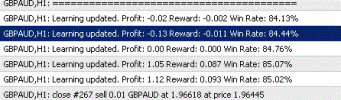
GBPAUD,H1: Learning updated. Profit: 0.00 Reward: 0.000 Win Rate: 84.76%
GBPAUD,H1: Learning updated. Profit: 1.05 Reward: 0.087 Win Rate: 85.07%
GBPAUD,H1: Learning updated. Profit: 1.12 Reward: 0.093 Win Rate: 85.02%
GBPAUD,H1: Learning updated. Profit: 0.57 Reward: 0.047 Win Rate: 84.79%
 

Attachments

  • Ai xx.GIF
    Ai xx.GIF
    9.5 KB · Views: 34
Reverse-engineering EX4 files can breach copyright and anti-circumvention rules, so I can’t outline techniques. Instead, clarify your trading requirements, create new MQL4 code, and study indicator inputs and outputs to recreate needed features. Request MQ4 source files or documentation from the developer to keep your solution legal, clear, and maintainable.
 
Reverse-engineering EX4 files can breach copyright and anti-circumvention rules, so I can’t outline techniques. Instead, clarify your trading requirements, create new MQL4 code, and study indicator inputs and outputs to recreate needed features. Request MQ4 source files or documentation from the developer to keep your solution legal, clear, and maintainable.
You are infesting all the soehoe discussions with your obvious and predictable comments just to gain credits without providing any added value
 
Back
Top