Dear Tanaka,
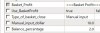
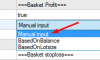
can you please tell me how to set the "basket Profit" settings? Whatever I put, it close always at $1 How to modify this?
What is the "Tick Entry" for? (I saw it in all your EA's)
Thanks a lot
Yes, this is it.
1. Comment
You can enter comments for EA as desired.
2. MAGIC
Magic number.
3. Auto Magic true
When set to true, the EA automatically assigns MAGIC# even when opening multiple currencies.
3. Slippage
Maximum value for slippage.
4. TickEntry
Set to true if you want to enter immediately when the indicator signals, otherwise, set to false, and entry will be made at the beginning of the next candlestick.
5. Reverse Entry
Enter in the opposite direction of the indicator signal.
6. Max spread (pips)
Maximum spread value (no entry will be made if it exceeds this value).
7. TRADE BUY&SEL
Select either BUY only, SELL only, or both for entry.
8. MaxPosition
Maximum number of orders to hold at once.
9. Baselots
Initial lot size.
10. TakeProfit (pips)
Take profit.
11. Stoploss (Pips)
Stop loss.
12. Order distance
If MaxPosition is increased, you can set the distance between BUY/SELL orders. Use this when you don't want to place consecutive orders or when you want to maintain a certain distance.
13. Risk trade/Use Risk/Risk percent
When the account balance increases, the lot size automatically increases based on a percentage.
14. Martingale in loss trade
Use this when you want to increase the next lot size if the order closes with a negative profit.
15. OppositeSignal
Close orders with the opposite signal of the indicator. When Close When Profit is set to true, it only closes with the opposite signal when there is a profit.
16. Trailing_stop
Trailing stop.
17. Break Even
Break-even (valid only once).
18. BasketProfits
Close all orders based on the total profit. Enter as a percentage of the balance or dependent on lot size (automatically calculates average profit) or enter a specific dollar amount.
19. Basket_Stoploss
Close all orders based on the total loss.
20. Time Filter
You can set up to a maximum of 3 time filters. The EA will only operate during the specified times, except for grid orders.
21. Grid order
Automatically adds additional orders at a fixed interval regardless of the indicator signal. Set the lot size multiplier and interval multiplier.
22. ProfitTarget (Daily Weekly)
You can set the maximum daily and weekly profits. The EA will automatically stop when this profit is reached and resume trading the next day.
23. News Filter
The news filter allows you to select the type of impact. You can set the number of minutes before the impactful news to stop the EA and the number of minutes after the news to resume trading.