
- Credits
- 0
Thanks James that you are picking up the ropes a bit.... much appreciatedI will do this. Just give me some few hours. I'm away from home and there's no power on my laptop at the moment. Will do it once power restored.

Thanks James that you are picking up the ropes a bit.... much appreciatedI will do this. Just give me some few hours. I'm away from home and there's no power on my laptop at the moment. Will do it once power restored.
The ignore button is a good tool, it helps you focus on whats important. There is a greater good involve on this thread and individual boasting and look who can piss the highest is not priorityAm happy to see brotherly love in this forum once again. God bless you all.
thank you broThanks James that you are picking up the ropes a bit.... much appreciated
which strategy? if Pinbar you should talk to Ahmad... https://soehoe.id/my-best-free-robots-martingale-lovers.t17425/page-12thank you bro
what strategy use this ea? how much time should i waiting for opening a position?
hi ademola, could you please share your set file for BSTREND on TF 5m. i will check itbelieve bstrend e.a.. is one of the best e.a ever done by tanaka with assistance of ahmad khan. For the past 6 month it has been consistent with good results. Short time e.g 1. 5minute time frame with trailing stop for scalping and 2.ahmed khan defult setting for 4hr time frame for long trading.

it work in demo account?this EA very profitable in backtest but not open any order in real account ,Can anyone fix this EA
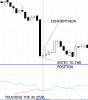
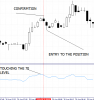
Thank you, I like it very much because it has a very complete Set Template that allow me to add filters.Find attached TREND SIGNAL EA. EA better on high tf from 1 hour above. Let's backtest, and optimize set files. Thank you.
Hi James,Please, find updated TREND SIGNAL.
CHANGES ADDED
1. lot size can be changed
2. Trading days can be selected
3. Trading time or period can be selected. Since the requested wants to limit trading on a particular time on Friday.
Martingale option removed
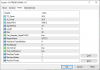
Hi, can you share directly mq4 please ?Please, find updated TREND SIGNAL.
CHANGES ADDED
1. lot size can be changed
2. Trading days can be selected
3. Trading time or period can be selected. Since the requested wants to limit trading on a particular time on Friday.
Martingale option removed
Thanks James226, for the courage of standing up to help.If anyone is interested in getting the source code, you might need to show evidence of further work you have done to get good settings. Then you will earn the source code. If we don't all work together, this thread could die. We all don't want that to happen.
Hi James,Starting lot size is the lot you want to trade e.g 0.01
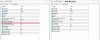
Hello James226, thanks for your efforts. I noticed that only the martingale is removed, no input to change the lot size and trading days/time. Please can these be adjusted.Please, find updated TREND SIGNAL.
CHANGES ADDED
1. lot size can be changed
2. Trading days can be selected
3. Trading time or period can be selected. Since the requested wants to limit trading on a particular time on Friday.
Martingale option removed
yes its open order on demo accountit work in demo account?
Please, find updated TREND SIGNAL.
CHANGES ADDED
1. lot size can be changed
2. Trading days can be selected
3. Trading time or period can be selected. Since the requested wants to limit trading on a particular time on Friday.
Martingale option removed
Hi James,I'll do that soon. I though I've added lotsize in options. I'll do it when on computer. Apologies

Excellent reply... they can build they own if they really want... do not understand why people are so damn lazy... lolMq4 is only going to be given to the person with impressive set files. We all have to participate in getting a good settings for any EA we create together here. We can all make it happen together.

could someone make an expert advisor with the trend mystery tanaka master template?








