- Credits
- 1,252
Hello, colleagues in gold speculation!
I once posted one of the versions of GoldFader_EA here — then the silence was such that you could hear the spread sliding on XAUUSD. But I wasn't offended, I rolled up my sleeves and took a good look at the adviser. Meet GoldFader_NewEA — now with a panel, brains and character.
What kind of beast?
This is a multi-mode scalper that does not enter the market with a saber drawn, but carefully arranges the ladder of pending orders. It works strictly according to XAUUSD (on other characters — at your own risk, but the warning is in the code).
The key features of this advisor are:
Two trading cores
Mode 1: SuperTrend + ADX. Loves the trend and doesn't bother when adx is asleep.
Mode 2: Keltner Channel + RSI. Catches bounces from the channel boundaries, but without fanaticism — the RSI should not be extreme.
You can turn it on individually (Mode 1/2), via "OR" (Mode 3, there are more signals) or a strict "And" (Mode 4, the signals are rare, but probably more accurate).
Stepped deposits with dynamic step
You can set a fixed distance between orders or link it to the ATR. Thanks to this, the grid does not stick together into a mess and does not put orders nose to nose.
Smart expiration and a momentum filter
Deposits live for a limited time (Acceleration), and if the market fades, the ADVISER removes them himself via DeletePendingMomThreshold. No "hang-ups" for a week.
Price averaging trailing
The UseAveragePrice = true option does not do tracking for each order separately, but for the average price of the direction. It's like you have one average position. Activated after TrallingStart points, trail distance = LockProfit.
Virtual stops
Real SL/TP can be disabled and virtual ones can be enabled. This saves brokers from hunting for stops, and at the same time allows you to drive the grid without unnecessary eyes.
Modern Dashboard
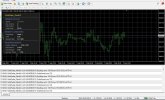
Dark, stylish, shows the signal, orders, profit, ATR, spread, equity/balance, drawdown and free margin. It is updated every 100 ms, it does not slow down. The eye is happy when you watch the green numbers run.
Protection from global dropdown and auto-profit
If the equity has dropped by MaxEquityDrawdownPct, everything is closed. If the total profit has reached 200 * lot, everything is also closed. The adviser knows how to say "enough is enough" in time.
Recommendations for use:
• Timeframe: by default, the indicators are considered on the current chart (I raced on M15, but you can try M5/M30).
• Tool: XAUUSD, 35-point spread filter — tolerable for most kitchens/normal brokers.
• Risk: a fixed 0.01 lot on the demo, but for real ones, it's better to enable UseRiskLot and set a comfortable percentage. The global drawdown of 15% is by default, you can preload.
• Virtual Stops: Run on demo first to understand the logic. You can turn off the real SL/TP (set to 0) and leave only the virtual ones — fewer traces in the glass.
• EntryMode Modes: Start with Mode 1 (trending) or Mode 2 (channel). Mode 3 (OR) gives more inputs, but can be noisy. Mode 4(S) — only if you are a perfectionist waiting for the perfect setup.
• Sessions: adjust it to your time zone. It is recommended to set SessionTimeMode = 1 (server time) in the tester, because local time does not fly in the tester.
What's new compared to that "quiet" version?
The averaged trailing has been completely rewritten, a panel, virtual stops, a momentum filter for removing deposits, dynamic distance via ATR and a bunch of minor protections have been added. In fact, this is no longer a shy freshman, but a seasoned third-year student who knows when to enter and when to leave for a smoke.
I will be glad for any feedback, constructive criticism and, of course, profitable schedules. If suddenly the adviser is ignored again, well, I'll put him in the "And" mode and go meditate on SuperTrend.
Download, test, and don't forget about money management. And remember: gold loves the patient!
I once posted one of the versions of GoldFader_EA here — then the silence was such that you could hear the spread sliding on XAUUSD. But I wasn't offended, I rolled up my sleeves and took a good look at the adviser. Meet GoldFader_NewEA — now with a panel, brains and character.
What kind of beast?
This is a multi-mode scalper that does not enter the market with a saber drawn, but carefully arranges the ladder of pending orders. It works strictly according to XAUUSD (on other characters — at your own risk, but the warning is in the code).
The key features of this advisor are:
Two trading cores
Mode 1: SuperTrend + ADX. Loves the trend and doesn't bother when adx is asleep.
Mode 2: Keltner Channel + RSI. Catches bounces from the channel boundaries, but without fanaticism — the RSI should not be extreme.
You can turn it on individually (Mode 1/2), via "OR" (Mode 3, there are more signals) or a strict "And" (Mode 4, the signals are rare, but probably more accurate).
Stepped deposits with dynamic step
You can set a fixed distance between orders or link it to the ATR. Thanks to this, the grid does not stick together into a mess and does not put orders nose to nose.
Smart expiration and a momentum filter
Deposits live for a limited time (Acceleration), and if the market fades, the ADVISER removes them himself via DeletePendingMomThreshold. No "hang-ups" for a week.
Price averaging trailing
The UseAveragePrice = true option does not do tracking for each order separately, but for the average price of the direction. It's like you have one average position. Activated after TrallingStart points, trail distance = LockProfit.
Virtual stops
Real SL/TP can be disabled and virtual ones can be enabled. This saves brokers from hunting for stops, and at the same time allows you to drive the grid without unnecessary eyes.
Modern Dashboard
Dark, stylish, shows the signal, orders, profit, ATR, spread, equity/balance, drawdown and free margin. It is updated every 100 ms, it does not slow down. The eye is happy when you watch the green numbers run.
Protection from global dropdown and auto-profit
If the equity has dropped by MaxEquityDrawdownPct, everything is closed. If the total profit has reached 200 * lot, everything is also closed. The adviser knows how to say "enough is enough" in time.
Recommendations for use:
• Timeframe: by default, the indicators are considered on the current chart (I raced on M15, but you can try M5/M30).
• Tool: XAUUSD, 35-point spread filter — tolerable for most kitchens/normal brokers.
• Risk: a fixed 0.01 lot on the demo, but for real ones, it's better to enable UseRiskLot and set a comfortable percentage. The global drawdown of 15% is by default, you can preload.
• Virtual Stops: Run on demo first to understand the logic. You can turn off the real SL/TP (set to 0) and leave only the virtual ones — fewer traces in the glass.
• EntryMode Modes: Start with Mode 1 (trending) or Mode 2 (channel). Mode 3 (OR) gives more inputs, but can be noisy. Mode 4(S) — only if you are a perfectionist waiting for the perfect setup.
• Sessions: adjust it to your time zone. It is recommended to set SessionTimeMode = 1 (server time) in the tester, because local time does not fly in the tester.
What's new compared to that "quiet" version?
The averaged trailing has been completely rewritten, a panel, virtual stops, a momentum filter for removing deposits, dynamic distance via ATR and a bunch of minor protections have been added. In fact, this is no longer a shy freshman, but a seasoned third-year student who knows when to enter and when to leave for a smoke.
I will be glad for any feedback, constructive criticism and, of course, profitable schedules. If suddenly the adviser is ignored again, well, I'll put him in the "And" mode and go meditate on SuperTrend.
Download, test, and don't forget about money management. And remember: gold loves the patient!