
You are using an out of date browser. It may not display this or other websites correctly.
You should upgrade or use an alternative browser.
You should upgrade or use an alternative browser.
New EA Daily Scalping, MM, News Filter and Shock News Mngt
- Thread starter AutoProfit
- Start date

- Credits
- 135
Hi,
I have replied all of your email.
I got 2 email from you.
please resend if any others.
thanks
I have replied all of your email.
I got 2 email from you.
please resend if any others.
thanks
I have identified a problem
At the end of the week I opened and closed the platform (ICMarkets)
On Sunday when the market opened the calendar was not active
So I closed and opened the platform again
Then it appeared
I suggest putting a program that certifies that the news calendar is active
Thank you again!
At the end of the week I opened and closed the platform (ICMarkets)
On Sunday when the market opened the calendar was not active
So I closed and opened the platform again
Then it appeared
I suggest putting a program that certifies that the news calendar is active
Thank you again!
- Credits
- 135
News calendar is updating every 1 hours.I have identified a problem
At the end of the week I opened and closed the platform (ICMarkets)
On Sunday when the market opened the calendar was not active
So I closed and opened the platform again
Then it appeared
I suggest putting a program that certifies that the news calendar is active
Thank you again!
and I only display USD, EUR, and GBP optional, and certain high impact news.

- Credits
- 135
Mas broo...ijin pakai ea nya yg versi lawas ya...heheheh
Soale ane lebih comfort versi lawas....thx
Sent from SoeHoe.ID mobile apps
Silakan,
versi baru lbh low risk dibandingkan versi lawas.
Modal minimal brp?dan spread paling lebar brp menurut agan?Silakan,
versi baru lbh low risk dibandingkan versi lawas.
Sent from SoeHoe.ID mobile apps
- Credits
- 135
saya selalu recommend 500,
tapi banyak juga yang deposit 250.
max spread 2pip.
tapi banyak juga yang deposit 250.
max spread 2pip.
Oh..ok thx....berarti 2pip klo 5 digit skitar 20 kan....hehehehsaya selalu recommend 500,
tapi banyak juga yang deposit 250.
max spread 2pip.
Sent from SoeHoe.ID mobile apps

- Credits
- 135
buat yang minat serius, boleh request langsung lah...malam semuanya, utk menghemat waktu apakah ada live acc dg password investor?
no limit.How long can I test the demo before buying the full program?
keep in touch for later version


Hello Admin/Moderator dan rekan-rekan trader semua, kembali lagi saya posting EA terbaru kami.
Setelah sekian lama tidak terlalu aktif di forum karena fokus melakukan testing dan improvement EA terbaru kami EA NAVHelios. EA ini merupakah hasil pengalaman dan analisa mendalam dari beberapa trader profesional yang kami rumuskan dalam model full 100% autotrading dengan kemampuan membaca news dan nyikapi kondisi market yang sedang bergejolak karena news impact serta kemampuan mengelolah equity yang kurang baik.
EA terbaru ini kami hadirkan dengan kemampuan diatas standard dengan sejumlah feature dan keunggulan sebagai berikut:
Fitur-fitur EA NAVHelios :
1. Target Harian
2. Filter News High Impact
3. Money Management
4. Auto Lot Size sesuai tingkat resiko
5. Compound Lot Size
Keunggulan :
- Based on Experience, Akurasi entry posisi yang tinggi yang dihasilkan dari kombinasi indicator premium dan pengalaman bertahun-tahun.
- High Impact News Management, Melakukan penutupan order sesegera mungkin disaat menjelang News High Impact dan mengatur ulang waktu new entry orders.
- Shocked News Management, Mendeteksi Pergerakan Market efek News yang tidak terjadwal dalam FF Calendar.
- Stable and Higher Profit, Mampu menghasilkan profit yang lebih tinggi dan konsisten.
- 24/5 100%, 24 Jam 5 Hari dan 100% otomatis trading tanpa perlu intervensi manual.
- Equity Crisis Recovery, dengan algoritma perhitungan condos order akan menentukan letak order berikutnya yang sesegera memperbaikin krisis equity bila ada.
Bagi kami, entry pertama harus akurat, karena bila entry kurang akurat maka akan meningkatkan resiko trading. Kami didukung dengan 2 Indicator Premium untuk menghasilkan signal entry yang sangat baik.
Namun kita juga menyadari ada kalanya signal tidak sesuai dan terutama saat memasuki news high impact. Karena itu kami lengkapi dengan feature Filter News dan kemampuan memperbaiki posisi yang salah utk mengembalikan equity.
Strategy Trading
secara kasat mata, mungkin terlihat umum dan tidak terlalu spesial. Kami menyempurna strategy yang sering digunakan dengan memadukan pengalaman dan kelebihan EA yang tidak mampu dilakukan secara manual.
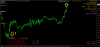
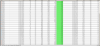
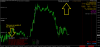
History of Trading
Perhatikan Balance saat awal trading, tab history dan tab trading.
Backtesting Result

NB: untuk backtest, feature News tidak aktif, sebab backtest tidak bisa mengupdate data kalender ekonomi (jadwal news)
Setup EA NAVHelios
NAVHelios.ex4
- Copy EA NAVHelios.ex4 to Experts folder
- Copy indicator iAutoBotCAV3.ex4 and iAutoBotCOGV2.ex4 to indicators folder
- Refresh/restart MetaTrader
- Tools, Options, click Expert Advisors Tabs and tick “Allow DLL imports”
- Attach EA NAVHelios on EURUSD/GBPUSD chart.
- TimeFrame M15
iAutoBotCAV3.ex4
iAutoBotCOGV2.ex4
I am using IC market.
Server time = GMT + 2
and, My VPS
Local time = GMT + 0
in this case,
Chart time offset
Please tell me the input value.
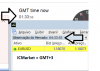
IC Marktet = GMT +3 not 2I am using IC market.
Server time = GMT + 2
and, My VPS
Local time = GMT + 0
in this case,
Chart time offset
Please tell me the input value.
Chart time offset =3
I'll give you a suggestion
The problem is in the name of the variable
Instead of calling chart time offset
Should call GMT_Offset
It gets easier
Attachments
Last edited:

Update EA NAVHelios Version 1.06
1. Update layer rule and distance
2. Allow Backtesting mode.
NAVHelios v1.06.zip
Mas Master Auto Profit, mau tanya nih kenapa Mas Heri omong lebih bagus yg lama dibanding yg update? Krn kita jadi bingung nih pake yg mana yg lama atau yg update? Mohon petunjuknya? Terima kasih
- Credits
- 135
Kami terus membuat kemajuan kedepan, karena itu kami meyakini update terbarulah yang terbaik.Mas Master Auto Profit, mau tanya nih kenapa Mas Heri omong lebih bagus yg lama dibanding yg update? Krn kita jadi bingung nih pake yg mana yg lama atau yg update? Mohon petunjuknya? Terima kasih
tetapi mungkin saja dalam kondisi tertentu, versi versi tertentulah yang lebih cocok.