• Welcome back! Thank you for being a part of this Traders Community. Let's discuss and share :)
    Selamat datang kembali! Trimakasih telah menjadi bagian dari Komunitas Trader ini. Mari berdiskusi dan berbagi :)

New EA GoldFader_NewEA returns: modified so that silence is canceled

Hello, colleagues!

I have news for you: Goldfader for MT4 got an older brother and moved to MetaTrader 5. Yes, yes, the one with SuperTrend + ADX, Keltner +RSI modes, virtual stops and a tricky grid of delays, only now in a terminal that does not ask for a reboot after each code edit.

Advantages of MT5 (for those who still have doubts):

• Strategy Tester — you run the adviser on all pairs at the same time, not one at a time, as in the old school. You can dig up a gold mine in an evening, not just one chart.

• The MQL5 code is cleaner, faster, events, timers, and you won't get confused in the "tickets" that change after each closure.

• Trading and testing on real ticks — without approximations of "all bars at opening prices". Gold likes precision, not "plus or minus bast shoes."

• And yes, MT4 is not getting any younger — it's time to move to a bright future where stop losses and takeaways can be moved without dancing with a tambourine.

You will also find detailed instructions (it is large, but I tried to chew through each item). There is a description of all the modes, the logic of trailing, how the "acceleration" of the removal of expired orders works. The Expert Advisor is tailored to XAUUSD, uses deposits, is friendly with sessions and is afraid of a large drawdown — in general, everything is as you like. If you have any questions or suggestions for improvement, welcome to the comments.

Download, test, and let the spread be narrow and the trend endless!
 

Attachments

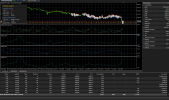
hello i already back test your ea in mt5. it's loosing little by little. Maybe i doing it wrong. the question is what is the TF? do you have set files for symbol? is this cent account trade?
 

Attachments

  • Screenshot 2026-06-16 072048.png
    Screenshot 2026-06-16 072048.png
    120 KB · Views: 35
hello i already back test your ea in mt5. it's loosing little by little. Maybe i doing it wrong. the question is what is the TF? do you have set files for symbol? is this cent account trade?
Hello, colleague!

Thank you for testing and taking the time to write — this is already half the battle.
Straight to the point: there is no ready-made settings file. Not because I'm greedy, but because the advisor is like a suit.: He sits like a rock on one broker, and hangs like a sack on the other. Everyone has their own spreads, stop levels, server time, and commissions - so a "universal set" is more likely to hurt here. The fact that he drains on default is the norm, which means that the broker/symbol is "not in resonance" with standard numbers.
What to do step by step:
1. Timeframe — ideally M15 or M30 (Advisor's chart = his working TF). Part of the logic (the impulse to kill expired orders) is hardwired on M15, so if you roll on H1, it will still work, but removing "rotten" deposits will go along M15 — this is normal. I recommend the M15.
2. Optimization is our everything. This is done quickly in the MT5 tester.:
Select a period (several months, with different market phases).
Start optimization based on key parameters: Step, StopLoss, TakeProfit, ADXThreshold, SuperTrendMultiplier, possibly EntryMode (signal mode).
Be sure to consider your Max_Spread — look at the broker's real spread and put it a little higher (for example, if you see 30 points, put 35).
Optimization criteria — for example, Recovery Factor or Profit Factor, do not chase net profit.
As a result, you will get settings tailored specifically for your broker and his kitchen.
3. A cent—based Expert Advisor account will work, but there is a caveat. The auto-lot formula (UseRiskLot) can produce a tiny amount like 0.001 lots, and the minimum lot in cents is often 0.01 (or 0.1, depending on how the broker thinks). It's better to disable the auto-lot for now and trade a fixed one, for example, Lots = 0.01. If the deposit is small, this is exactly what the doctor ordered.
4. The XAUUSD symbol — make sure that your broker's name is strictly XAUUSD, without dots or suffixes like XAUUSD. or XAUUSDc. The code has a strict _Symbol check != "XAUUSD", if the name does not match, the ADVISER will not trade. If you really want to focus on just such a character. But it's easier to find a broker with a normal name.
5. Default = not the Holy Grail. The out—of-the-box settings are like the average temperature in a hospital: some are warm, some are cool. I deliberately gave conservative figures so that the adviser would not immediately fly into space. And you have already tuned it for your "engine". In the MT5 tester, it's a couple of evenings, but then you can sleep in peace.
 
Loss Loss Loss
Wow, "Loss Loss Loss" sounds like a verdict without the right to appeal. Where are the details? I'm a simple person: show me the settings, the timeframe, and the broker. I'm happy to admit that I messed up somewhere if they show me exactly where. But "Loss Loss Loss" is not an argument, it's the name of a bad thriller.
As I said before, I don't hold onto this advisor like I hold onto a crystal vase. I have other projects, ideas, and advisors that don't always work perfectly either, but at least it's clear why. I didn't come here to prove to everyone that GoldFader is the Holy Grail, but I was interested in seeing who was on the forum: people who were willing to tweak settings, optimize, figure things out, and give feedback. Or those who download it, launch it on default, see a minus sign and write "Loss Loss Loss".
Judging by your answers, we have a second case here. Well, it happens. Good luck in finding the Expert Advisor who spits right out of the box, without a single finger movement.
 
Wow, "Loss Loss Loss" sounds like a verdict without the right to appeal. Where are the details? I'm a simple person: show me the settings, the timeframe, and the broker. I'm happy to admit that I messed up somewhere if they show me exactly where. But "Loss Loss Loss" is not an argument, it's the name of a bad thriller.
As I said before, I don't hold onto this advisor like I hold onto a crystal vase. I have other projects, ideas, and advisors that don't always work perfectly either, but at least it's clear why. I didn't come here to prove to everyone that GoldFader is the Holy Grail, but I was interested in seeing who was on the forum: people who were willing to tweak settings, optimize, figure things out, and give feedback. Or those who download it, launch it on default, see a minus sign and write "Loss Loss Loss".
Judging by your answers, we have a second case here. Well, it happens. Good luck in finding the Expert Advisor who spits right out of the box, without a single finger movement.
You Show us profit statement?!
 
and mt5 file ea not work , nothing happen when i try to start ea!
"Will you show me the profit and loss statement?"

I've already said more than once: the adviser is a semi—finished product, not canned food. Before frying, you need to season it for your kitchen (read: broker). Demanding a profit report from the boxed settings is like asking a bicycle for a Formula 1 speed certificate without pressing the pedal.

"The MT5 Advisor file is not working, nothing is happening"

Here in more detail, please. I have it running for sure and putting delays (checked more than once). If you have silence on the air — possible reasons:

1. You have not allowed automatic trading (the check mark in the terminal settings that everyone forgets about).

2. The symbol is not XAUUSD (with a dot, suffix, etc.) — the ADVISER will silently refuse.

3. The spread is higher than allowed — the adviser stands and smokes bamboo, because the market does not allow it.

4. You are not in a trading session (check the SessionTimeMode and the clock).

In the meantime, don't shoot the pianist, he's playing as well as he can. And remember: optimization is our everything.
 
"Will you show me the profit and loss statement?"

I've already said more than once: the adviser is a semi—finished product, not canned food. Before frying, you need to season it for your kitchen (read: broker). Demanding a profit report from the boxed settings is like asking a bicycle for a Formula 1 speed certificate without pressing the pedal.

"The MT5 Advisor file is not working, nothing is happening"

Here in more detail, please. I have it running for sure and putting delays (checked more than once). If you have silence on the air — possible reasons:

1. You have not allowed automatic trading (the check mark in the terminal settings that everyone forgets about).

2. The symbol is not XAUUSD (with a dot, suffix, etc.) — the ADVISER will silently refuse.

3. The spread is higher than allowed — the adviser stands and smokes bamboo, because the market does not allow it.

4. You are not in a trading session (check the SessionTimeMode and the clock).

In the meantime, don't shoot the pianist, he's playing as well as he can. And remember: optimization is our everything.
You didn't understand me! The expert doesn't even load the settings window, I double-click on it and nothing happens! The expert is in the right folder!
 
You didn't understand me! The expert doesn't even load the settings window, I double-click on it and nothing happens! The expert is in the right folder!
Ah, now I see the catch! It's a classic of switching from MT4 to MT5. In the "four", a double click on the adviser in the Navigator immediately hooked it to the chart, but in MT5, alas, it does not work that way. Therefore, "nothing happens" — the ADVISER is just waiting for it to be dragged with the mouse.
How to launch it correctly:
Open the XAUUSD chart (or another one).
In the Navigator (left window), find the folder "Advisors", there is your GoldFader_NewEA.
Left-click it and drag it onto the chart.
Release it and the settings window will appear immediately. You can also right-click on the Expert Advisor in the Navigator and select "Attach to graph".
No double clicks, just drag &drop, like in the good old quests.
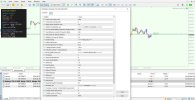
A screenshot to boost morale.
Drag it and you will be happy. If the window does not appear after that, check if the DLL is blocked (in the terminal settings, "Allow DLL import" should be enabled, although our advisor does not need it, but sometimes the blocking of advisors is global).
 

Attachments

  • Clipboard02.jpg
    Clipboard02.jpg
    248.3 KB · Views: 14
Please provide a version compiled without AVX2 support, compatible with AVX CPUs.
The line cpu='AVX2 + FMA3' during compilation is just the "signature" of my computer on which I built the ADVISOR. Like "made in a kitchen with an induction hob". But the pie itself (ex5 file) does not require induction to be eaten. It is absolutely universal and will run even on the ancient Celeron, which remembers Windows XP and SSE2.
The MetaTrader 5 is not tied to AVX, SSE or FMA — the main thing for it is that the terminal starts. And if your terminal is loading and showing graphs, it means that the processor has already passed face control. So don't look for the problem in the "stone" — it's definitely not there.
 
My platform:
2026.06.18 16:17:52.147 MQL5 your CPU architecture does not allow to run the file 'GoldFader_NewEA v2.0.ex5': AVX2 required, you have AVX only
 
My platform:
2026.06.18 16:17:52.147 MQL5 your CPU architecture does not allow to run the file 'GoldFader_NewEA v2.0.ex5': AVX2 required, you have AVX only
I have recompiled GoldFader_NewEA v2.0, now it should be friendly with AVX. There are no requirements for newfangled extensions now. The new file is attached to the post below. It should definitely work now.
 

Attachments

I have recompiled GoldFader_NewEA v2.0, now it should be friendly with AVX. There are no requirements for newfangled extensions now. The new file is attached to the post below. It should definitely work now.
Now it works! But if this expert is profitable, why are you sharing it with us? What about your life? Thanks!
 
Back
Top